6-Contributor
October 18, 2023
Solved

All of rows deleted except an edited row in the Advance Grid

  • October 18, 2023
  • 1 reply
  • 1082 views

Hi, All

I have one question on Thingworx9.2.0 as follows;

(1) Create a Infotable include 3 rows 

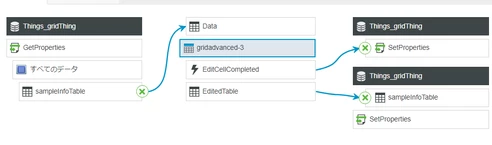
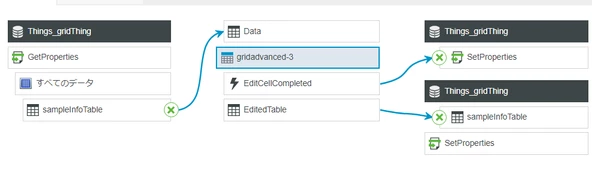
(2) Create a mashup using AdvanceGrid and Infotable as follows

      DEVYIDEyoshi_1-1697662511776.png


(3) Show the mashup then 3 rows are displayed on the AdvanceGrid.

(4) Edit a cell value.

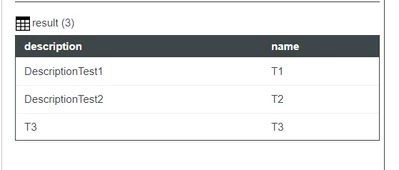
(5) Immediately, other 2 rows are deleted from AdvanceGrid and Infotable.

(6) This is correct or something wrong? 

DEVYIDEyoshi_0-1697662249198.png

Regards,


Best answer by Velkumar

Hi @DEV,YIDE,yoshi 


EditedTable Infotable from the grid contains only edited row values.


For example, if you have 3 rows and you are editing only the 2nd row. EditedTable will contain only the 2nd Row value and if you update the property value using the SetProperties service it will overwrite the previous value which contains all rows. That is the reason for other rows getting deleted.


To overcome this you can create a custom service that takes EditedTable value as input and updates only the affected row in the property without removing other rows.


Sample Code :


I have a dummy InfoTable property with 3 rows in it and name field is the primary key
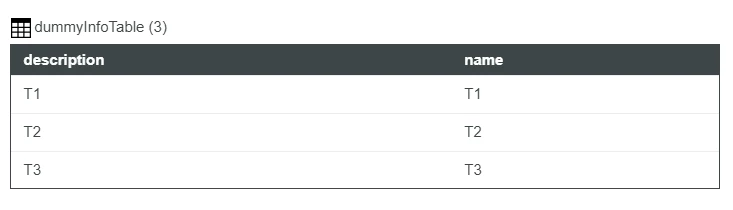
Velkumar_0-1697680626353.png

Script to update only edited value 

if(EditedTable)
{
 // Get property data
 let allData = me.dummyInfoTable;
 
 // Iterate over editedTable Infotable
 for(var i = 0; i < EditedTable.length; i++)
 {
 // get editedTable key value
 var keyValue = EditedTable.rows[i].name;
 
 // Iterate over allData InfoTable
 for (var k = 0; k < allData.length; k++)
 {
 // get allData key value
 var allDataKeyValue = allData.rows[k].name;
 
 // update allData value with edit value if key matches
 if(allDataKeyValue === keyValue)
 {
 allData.rows[k].description = EditedTable.rows[i].description;
 break;
 }
 }
 }
 
 // Update property value 
 me.dummyInfoTable = allData;
 
}
var result = me.dummyInfoTable;


Sample Input :
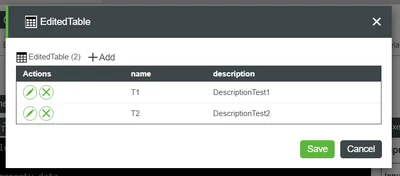
Velkumar_1-1697681330591.png


Updated property value

Velkumar_2-1697681352234.png


/VR


1 reply

Velkumar19-TanzaniteAnswer
19-Tanzanite
October 19, 2023

Hi @DEV,YIDE,yoshi 


EditedTable Infotable from the grid contains only edited row values.


For example, if you have 3 rows and you are editing only the 2nd row. EditedTable will contain only the 2nd Row value and if you update the property value using the SetProperties service it will overwrite the previous value which contains all rows. That is the reason for other rows getting deleted.


To overcome this you can create a custom service that takes EditedTable value as input and updates only the affected row in the property without removing other rows.


Sample Code :


I have a dummy InfoTable property with 3 rows in it and name field is the primary key

Velkumar_0-1697680626353.png

Script to update only edited value 

if(EditedTable)
{
 // Get property data
 let allData = me.dummyInfoTable;
 
 // Iterate over editedTable Infotable
 for(var i = 0; i < EditedTable.length; i++)
 {
 // get editedTable key value
 var keyValue = EditedTable.rows[i].name;
 
 // Iterate over allData InfoTable
 for (var k = 0; k < allData.length; k++)
 {
 // get allData key value
 var allDataKeyValue = allData.rows[k].name;
 
 // update allData value with edit value if key matches
 if(allDataKeyValue === keyValue)
 {
 allData.rows[k].description = EditedTable.rows[i].description;
 break;
 }
 }
 }
 
 // Update property value 
 me.dummyInfoTable = allData;
 
}
var result = me.dummyInfoTable;


Sample Input :

Velkumar_1-1697681330591.png


Updated property value

Velkumar_2-1697681352234.png


/VR


6-Contributor
October 19, 2023

Hi, Velkmar

Thank you so much for your quick answer and accurate answer.

 I am so grad to talk with you again.

best regards,