
17-Peridot
March 3, 2023
Solved

Auto Complete widget

  • March 3, 2023
  • 1 reply
  • 2054 views

Hello,


I have a use case where I want to use the auto complete widget.

However when implemented, it seems to not work correctly, or at least not all the time.


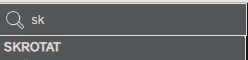
The following is a search I've made setting the "MinimumLength" property to 1:
jensc_0-1677831210640.png

As you can see, I get some values.


But as soon as I add one more character, I get no results:

jensc_1-1677831297009.png


This doesn't always happen as you can see here:

jensc_2-1677831332436.png


So it doesn't seem to be because of the amount of text.


If anyone has had similar experiences and have found a fix for it, or that could confirm that this is some issue with the widget, that'd be great. This way I can continue on with my work.


Thanks,

Jens


Best answer by jensc

Hello,


As my colleagues had not faced the same issue and I haven't been able to figure it out, I'll just continue to use the dropdown as it is supported.


Thanks,

Jens

1 reply

16-Pearl
March 3, 2023

I did not have issues yet. Can you confirm the first example has the same "string" value? like e.g. the "r" is in a different charset or theres some invisble character between 'k' and 'r'? so it does not match...

jensc17-PeridotAuthor
17-Peridot
March 3, 2023

Hello,


I was thinking the same thing, however I am unsure how I would be able to check it.

There are several things that can not be shown. However using the dropdown widget, the filtering allows me to see the row:

jensc_0-1677857874231.png

Left is dropdown widget with filter function, and right is Auto Complete widget before writing the "r".


I checked in the dev tools after right clicking the row in auto complete widget:

jensc_1-1677857952652.png

<li class="ui-menu-item" id="ui-id-5535" tabindex="-1">SKROTAT</li>

To me it looks like it is just normal "swedish" text.


I was thinking maybe some of my custom CSS was messing with it so build a new mashup with just the widget but still the same issue.


This data does come from an import of a CSV, then it is set as a property on a thing.

I also tried setting the value manually, but still no luck.


Thanks,

Jens

16-Pearl
March 3, 2023

Hm. May check in the network tab, what is received from the server - what the service returns in json when fetching the values for the dropdown... But seems weird yeah


Edit: Ah I confuces "AutoComplete" with the "Dropdown"-widget. I did not use AutoComplete yet - or have no memory on the issue. I remember we had some issues.. but not sure what they were anymore 😛