
1-Visitor
October 4, 2019
Question

auto increment primary key in the datatable

  • October 4, 2019
  • 1 reply
  • 5294 views
var week = me.GetWeekNumber({ date: when }); // Copied from Stack Overflow, didn't test its correctness
var month = when.getMonth(); // Zero-based
var year = when.getFullYear();
var correctmonth = month +1;
var query = me.CreateValuesWithData({ values: {
value: value,
Kategory: Kategory,
Department:Department,
Line: Line,
SKU : SKU,
KPI_Details: KPI_Details,
Target: Target,
Other_Target : Other_Target,
Other_value : Other_Value,
week: week,
month: correctmonth,
year: year
} });
query.id = me.ID;
var params = {
sourceType: undefined /* STRING */,
values: query /* INFOTABLE*/,
location: undefined /* LOCATION */,
source: undefined /* STRING */,
tags: undefined /* TAGS */
};
if(me.ID !== query.id){
stop();
}
var result = me.AddDataTableEntry(params);
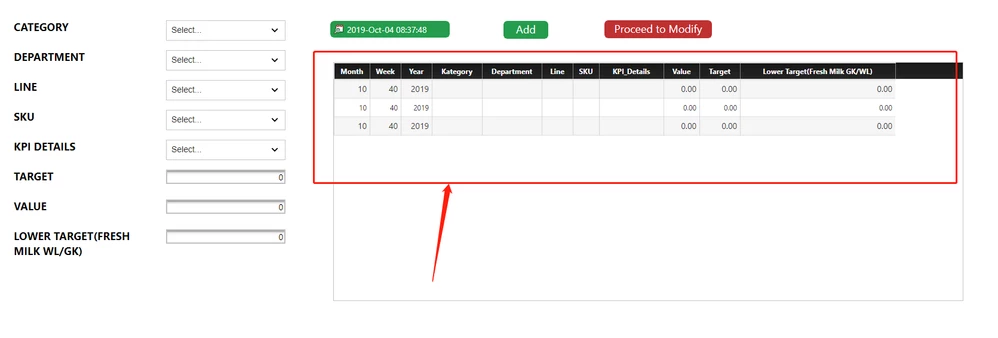
 

clipboard_image_0.png

when I refresh the page, it will auto increment one more empty row in the grid widget. 


how to fix this problem? 

1 reply

22-Sapphire I
October 4, 2019

What exactly are you trying to accomplish?

Nothing in your code shows any sort of 'auto increment' of a primary key. This isn't something that Thingworx supports (compared to an SQl db).

I recommend if you need to track unique records, assign the Primary fields in the DataShape

if you just need to tag unique records, use GenerateGUID to assign a GUID per record


Perhaps if you explain your use case that could help generate proper recommendations.

xiaoqw1-VisitorAuthor
1-Visitor
October 4, 2019

Hi @PaiChung,

I just want to make sure everytime I refresh the page, primary key cannot auto increment and once I click "add" button, the new data will show in the grid widget.  Primary key should be in sequence.

18-Opal
October 5, 2019

Hello,


Why don't you increment your primary key directly in the service which adds new record, right before adding it?


/ Constantine