Description Problem:
When I started the thingwox connector (which was always good for an abundant year), thousands of threads were opened constantly and grew.
This caused the saturation of RAM and CPU memory:
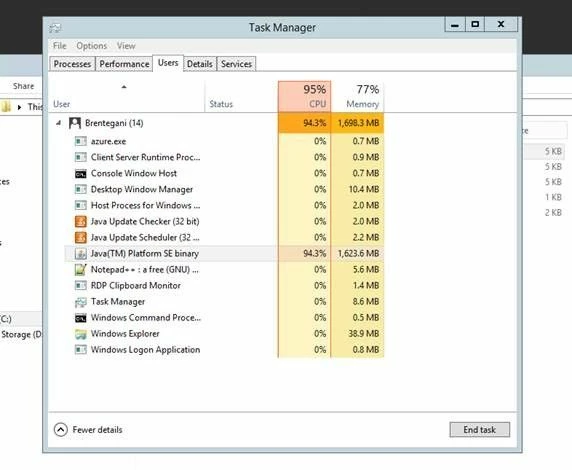
and when I tried to send C2D messages or read D2C message in thingworx log it was as follows:
Wrapped java.util.concurrent.TimeoutException: Timed out APIRequestMessage [requestId: 179343, endpointId: -1, sessionId: -1, method: POST, entityName: AzureIot-cxserver-f7f78e8f-7ed1-4ee5-be25-3e13b7498724, characteristic: Services, target: AzureIotSendMessage] Cause: Timed out APIRequestMessage [requestId: 179343, endpointId: -1, sessionId: -1, method: POST, entityName: AzureIot-cxserver-f7f78e8f-7ed1-4ee5-be25-3e13b7498724, characteristic: Services, target: AzureIotSendMessage]
The connector became unusable after a reboot.
I then activated, to put a patch to the problem, a sheduler in ubuntu: crontab that every 20 min restarts the service of the connector to avoid the saturation of resources.
The following warn was repeated in the connector log:
08:30:30.093 [Thread-42] DEBUG servicebus.trace - entityName[iothubproduction/ConsumerGroups/westeurope/Partitions/0], condition[Error{condition=null, description='null', info=null}]
08:30:30.093 [pool-5-thread-3] WARN eventprocessorhost.trace - host AzureIot-6a15a0c4-1040-4898-9312-cd9dff0977c1: partition 0: Failure creating client or receiver, retrying
08:30:30.093 [pool-5-thread-3] WARN eventprocessorhost.trace - host AzureIot-6a15a0c4-1040-4898-9312-cd9dff0977c1: partition 0: Caught java.util.concurrent.ExecutionException: com.microsoft.azure.servicebus.ServiceBusException: The supplied offset '137459006072' is invalid. The last offset in the system is '4604792' TrackingId:54e3a5a5-f7ec-4dcc-b3fc-84554378d7d2_B10, SystemTracker:iothub-ns-iothubprod-1202394-e704e8b244:eventhub:iothubproduction~8191, Timestamp:2019-01-21T08:30:29 Reference:d8a82a0e-7b13-45ff-8a00-15977a8e67bd, TrackingId:74d4a55a-7b08-4051-b45f-ee5ff7b90afd_B10, SystemTracker:iothub-ns-iothubprod-1202394-e704e8b244:eventhub:iothubproduction~8191|westeurope, Timestamp:2019-01-21T08:30:29 TrackingId:f0f7fb9ed7974ca4a1201437327ad188_G7, SystemTracker:gateway5, Timestamp:2019-01-21T08:30:29, errorContext[NS: iothub-ns-iothubprod-1202394-e704e8b244.servicebus.windows.net, PATH: iothubproduction/ConsumerGroups/westeurope/Partitions/0, REFERENCE_ID: 26e7ba_d188_G7_1548059429671]
08:30:30.093 [pool-5-thread-3] WARN eventprocessorhost.trace - host AzureIot-6a15a0c4-1040-4898-9312-cd9dff0977c1: partition 0: java.util.concurrent.CompletableFuture.reportGet(CompletableFuture.java:357)
08:30:30.093 [pool-5-thread-3] WARN eventprocessorhost.trace - host AzureIot-6a15a0c4-1040-4898-9312-cd9dff0977c1: partition 0: java.util.concurrent.CompletableFuture.get(CompletableFuture.java:1895)
08:30:30.093 [pool-5-thread-3] WARN eventprocessorhost.trace - host AzureIot-6a15a0c4-1040-4898-9312-cd9dff0977c1: partition 0: com.microsoft.azure.eventprocessorhost.EventHubPartitionPump.openClients(EventHubPartitionPump.java:126)
08:30:30.093 [pool-5-thread-3] WARN eventprocessorhost.trace - host AzureIot-6a15a0c4-1040-4898-9312-cd9dff0977c1: partition 0: com.microsoft.azure.eventprocessorhost.EventHubPartitionPump.specializedStartPump(EventHubPartitionPump.java:46)
08:30:30.093 [pool-5-thread-3] WARN eventprocessorhost.trace - host AzureIot-6a15a0c4-1040-4898-9312-cd9dff0977c1: partition 0: com.microsoft.azure.eventprocessorhost.PartitionPump.startPump(PartitionPump.java:70)
08:30:30.093 [pool-5-thread-3] WARN eventprocessorhost.trace - host AzureIot-6a15a0c4-1040-4898-9312-cd9dff0977c1: partition 0: com.microsoft.azure.eventprocessorhost.Pump.lambda$createNewPump$0(Pump.java:61)
08:30:30.093 [pool-5-thread-3] WARN eventprocessorhost.trace - host AzureIot-6a15a0c4-1040-4898-9312-cd9dff0977c1: partition 0: java.util.concurrent.FutureTask.run(FutureTask.java:266)
Problem Resolution:
The architecture used until now is as follows:
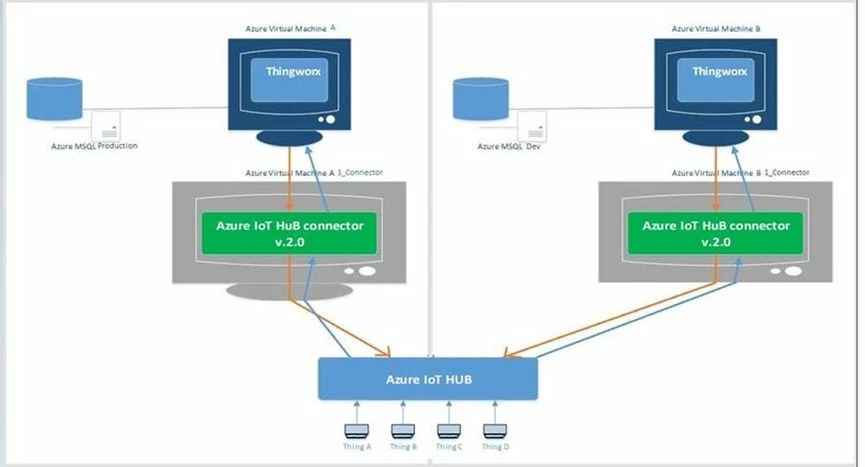
On iot hub there are two different consumer groups for each connector:

Support PTC thanks to 'Mainente, Stephane' after talking to and investigating with the connector developer advised me to do the following things:
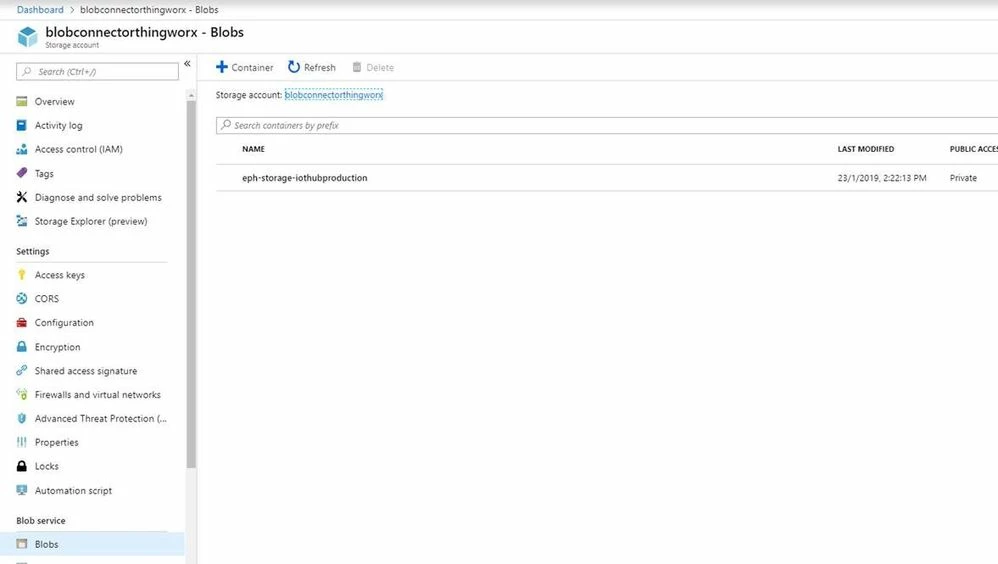
The connector uses an Azure storage account.
1) At the suggestion of Stephane I deleted all the blobs created by the connector:
2) He sent me some lines to add in the connector configuration:
blob-storage {
accounts {
default {
// <blob-store> > Settings > Access Keys > Storage account name
account-name = "blobconnec******"
// <blob-store> > Settings > Access Keys > key1 or key2
account-key = "KUvEgXZKehDzFA6Q1EFMyVqdVokeR6DMdH8IfMlzcFQdZoxt/9pwvGzQ******"
}
event-processor-host {
container-name = "eph-storage-"${cx-server.protocol.eventHubName}
account = default
}
}
}
3) Restarted the connector.
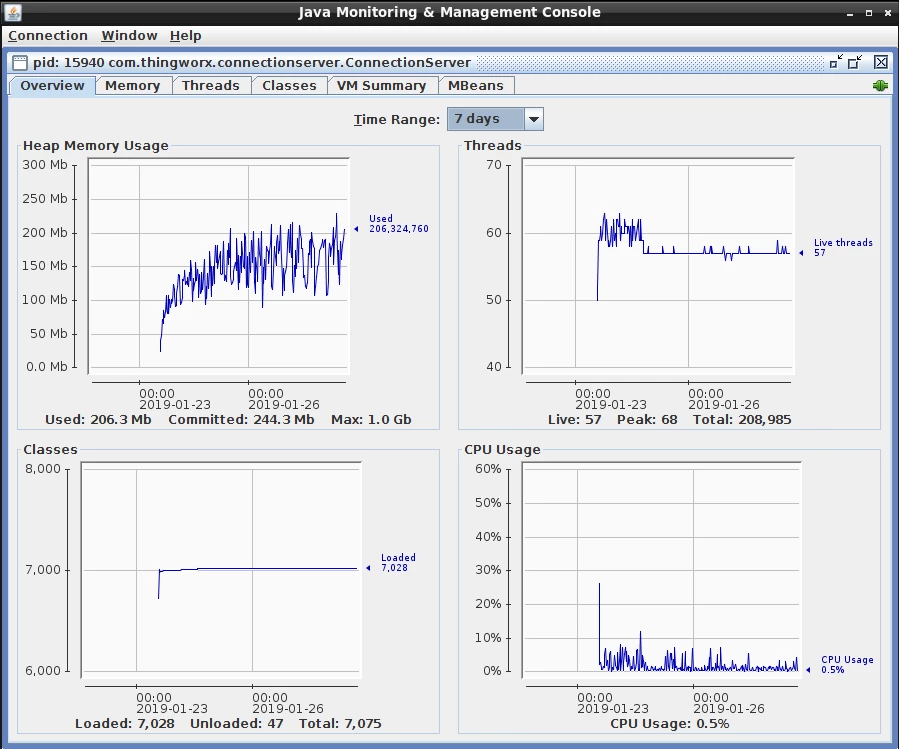
Threads are now of normal value[50-65]. [during problems increased over 5000 threads].
Here below the proof of normal functionality of the thingworx connector.
Bye


