
13-Aquamarine
April 29, 2021
Solved

Border selecting the value display

  • April 29, 2021
  • 1 reply
  • 2067 views

Hello,


I'm using a mashup collection to handle my menu. In the menu mashup I have a value display. Unfortunately when the user click on it a border appears around it. I think this is due to


root : {

--ptcs-focus-overlay--border-width: 2px;

}

How can I avoid that? I'm using ThingWorx 9.1.1-b483
Best answer by yhan

Hi @gch,


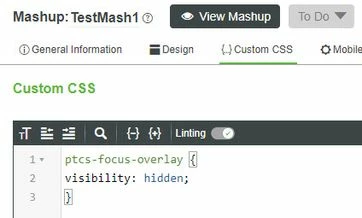
Got your issue,  you can add the following to the "custom CSS" tab of the mashup.

ptcs-focus-overlay {
visibility: hidden;
}

5-6-2021 11-51-36 AM.jpg

Then the border wouldn't appear when you click the value.


Thanks,

/Yoyo

1 reply

17-Peridot
April 30, 2021

Hi @gch,


Please check if below steps can help you resolve this issue:

1. Access the Style Properties pane of menu in master definition;

2. In Style Properties pane, select MenuStyle and change Line Thickness to a small value


Thanks,

/Yoyo

gch13-AquamarineAuthor
13-Aquamarine
April 30, 2021

Hi Yoyo, I'm not using the TW Menu item, I'm using the value display widget. I already tried to modify the style without success.

yhan17-PeridotAnswer
17-Peridot
May 6, 2021

Hi @gch,


Got your issue,  you can add the following to the "custom CSS" tab of the mashup.

ptcs-focus-overlay {
visibility: hidden;
}

5-6-2021 11-51-36 AM.jpg

Then the border wouldn't appear when you click the value.


Thanks,

/Yoyo