1-Visitor
August 9, 2018
Solved

Calendar widget - How to display Monday to Sunday?

  • August 9, 2018
  • 2 replies
  • 2790 views

Hi,


Calendar is showing Sunday to Monday when we click the calendar icon in a mashup. I want to change the day order and show Monday to Sunday when the user click calendar icon? Pl help!

Best answer by tkawasaki

Hi,

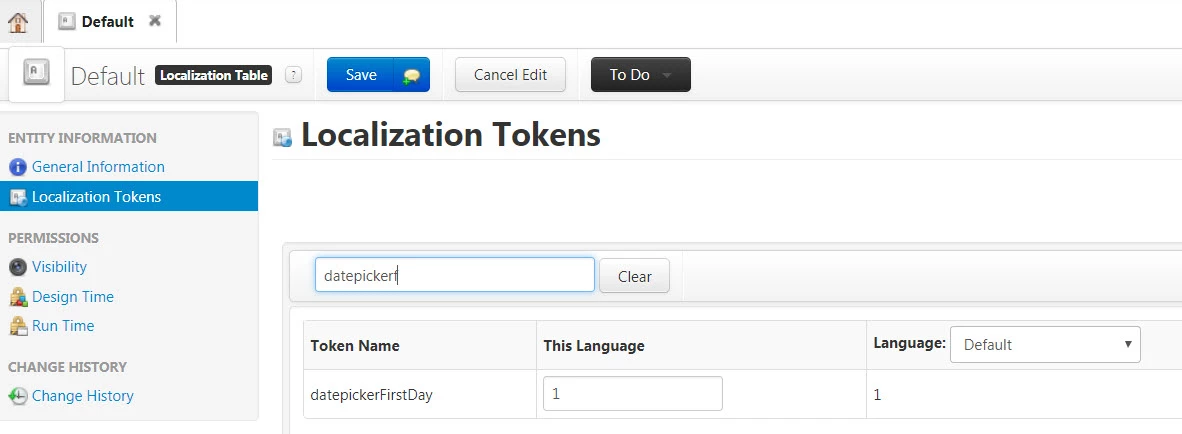
jQuery is used to display the calendar and you can configure the calendar to show Monday as the start of the week by setting 1 to datepickerFirstDay in Localization Tokens. (0 to show Sunday as the start day of the week)


Go to Composer > SYSTEM > Localization Tables > Default > Localization Tokens set 1 to This Language row of datepickerFirstDay.


2018-08-15 17-39-14.jpg

2 replies

5-Regular Member
August 14, 2018

Hi @pselvaraj-1 which calendar widget are you referring to? Is it a custom widget or are you referring to the timeselector or datetime picker widget?

1-Visitor
August 14, 2018

I am using datetime picker which comes with thingworx foundation. 

tkawasaki5-Regular MemberAnswer
5-Regular Member
August 15, 2018

Hi,

jQuery is used to display the calendar and you can configure the calendar to show Monday as the start of the week by setting 1 to datepickerFirstDay in Localization Tokens. (0 to show Sunday as the start day of the week)


Go to Composer > SYSTEM > Localization Tables > Default > Localization Tokens set 1 to This Language row of datepickerFirstDay.


2018-08-15 17-39-14.jpg

1-Visitor
August 20, 2018

It works, Thank You!