1-Visitor
January 15, 2021
Solved

Can I Change background color cell in a grid dynamically?

  • January 15, 2021
  • 2 replies
  • 2727 views

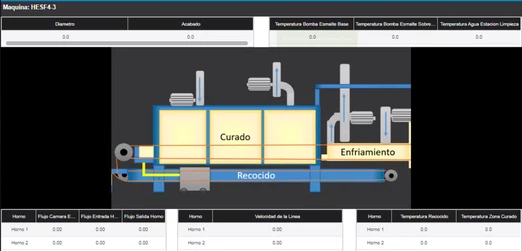
I made this mashup 

CC_9592114_0-1610734361056.png

I want to know if i can change a background color of a cell in the grid advanced depending of a cell value


Ex. In the first grid i have a value of "Diametro" it is diameter in spanish, if the value is between  100 to 200

the background color will be green, but if the value is under 100  the color will be red


Can i do this with a service or another tool?


Ty

Best answer by c_lowy

Hi @Carlos97,


Cell-based state formatting indeed will not allow you to set limits dynamically. This should be achievable using a Configuration Service (Configuration property of Grid Advanced) as per Working with a Configuration Service by associating a stateDefinition to the column you want and use the service's input parameters to assign values.


Note that unlike what is stated here the example entities GridAdvancedExampleEntities.xml are not currently available on the PTC Software Download page. This has been reported so it can be added there. For now you will find the entities attached to this post.

2 replies

5-Regular Member
January 15, 2021

Hi @Carlos97 


Thank you for reaching out to us.


Please check this community post  How to Change Grid Cell Color Based upon value coming from Database 

It contains the steps and details of using the State Based Formatting which I think you need for your use case.


Let us know in case your use case differs.


Regards,

Toolika Dixit

Carlos971-VisitorAuthor
1-Visitor
January 18, 2021

it´s almost what i was looking for, but i don´t want to hardcode the limits, i´ll took the value for a thing propertie

c_lowy16-PearlAnswer
16-Pearl
January 25, 2021

Hi @Carlos97,


Cell-based state formatting indeed will not allow you to set limits dynamically. This should be achievable using a Configuration Service (Configuration property of Grid Advanced) as per Working with a Configuration Service by associating a stateDefinition to the column you want and use the service's input parameters to assign values.


Note that unlike what is stated here the example entities GridAdvancedExampleEntities.xml are not currently available on the PTC Software Download page. This has been reported so it can be added there. For now you will find the entities attached to this post.

Support
February 1, 2021

Hi @Carlos97.


If you feel your question has been answered, please mark the appropriate response as the Accepted Solution for the benefit of others with the same question.


Regards.


--Sharon