8-Gravel
October 31, 2023
Question

Can i import data and edit at mashup

  • October 31, 2023
  • 1 reply
  • 1659 views

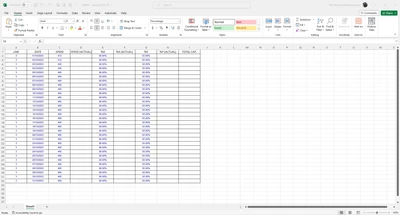
First i get data from excel like this

2.png

and then import to Thingworx and create datashape like this
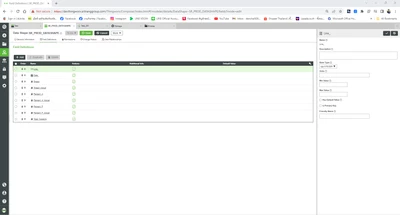
1.png

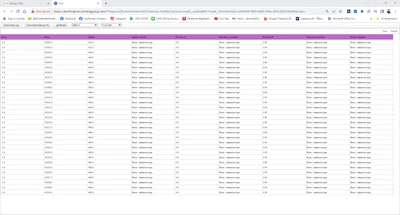
and show data in grid at mashup

3.png

but data not show the same as raw data

Can i setting to show as the raw data in grid table and edit data in table?


1 reply

16-Pearl
October 31, 2023

Hi @DR_10558933 ,


 I have tried to replicate the same case in my local Thingworx 9.4.0, its working fine. Can you please post your code/snippet which you have utilized in your service along with your Thingworx version.


Sample CSV File: 

Arun_C_2-1698732831211.png


Sample Code to import CSV file to Thingworx  using ReadCSVFile Snippet:

Arun_C_0-1698731912798.png


Datashape fields:

Arun_C_1-1698732023559.png

Expected Output as Infotable:

Arun_C_3-1698732898533.png

Final Mashup Update in Grid:

Arun_C_0-1698732549028.png

Thanks & Regards,

Arun C


8-Gravel
October 31, 2023

This is my code

4.png

16-Pearl
October 31, 2023

Hi @DR_10558933 ,


As per the Parsley Extension - 2.2.8 they mentioned in the note that "ParseXLSX is rudimentary and expects a simple grid of data. It also requires the Apache POI libraries, which conflict with some other extensions". I think the complete XLSX parsing may not be work in this case. 


ParseJSON & PasreCSV are working fine in Parsley Extension. If it is single sheet data better go with CSVParseFunctions by importing & parsing the CSV files which is recommended by PTC Team.


Arun_C_0-1698744823170.png


As per this post you can also check with this person for the parsley extension related queries @jamesm1 /jmccuen@ptc.com.


Thanks & Regards,

Arun C