8-Gravel
Oct 6, 2023 3:23 AM UTC
Solved

Cannot show line chart

I get data from Kepware in DWORD and want to show in mashup but doesn't show. How to solve it?


17-Peridot
Oct 6, 2023 6:09 AM UTC

You have to few more steps to show data in line chart,

  • Log the Thing property values
    • Options: ValueStream, Stream, External Table
    • Easiest way to log the property values is Value Stream method
  • Use "QueryPropertyHistory()" service to pull all logged values.


To log into Value stream:

  1. Create value stream with "ValueStream" as Thing Template.
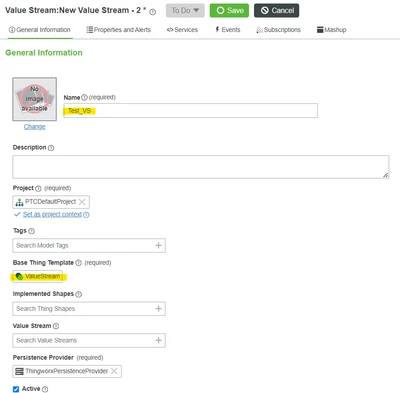
Sathishkumar_C_1-1696572235514.png

2. Attach the Value Stream into the Thing where the properties needs to be logged.
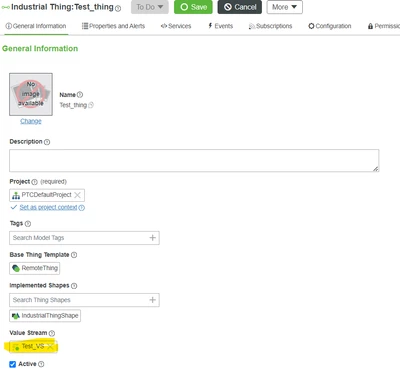
 

Sathishkumar_C_9-1696572602419.png

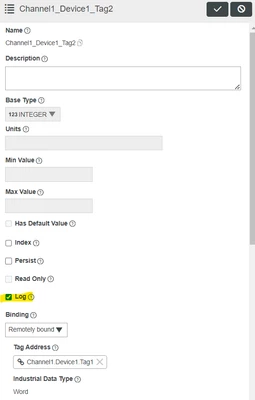
3. Make property to be "Log"

Sathishkumar_C_0-1696572174276.png

4. Now, you can use QueryPropertyHistory()


8 replies

16-Pearl
Oct 6, 2023 5:17 AM UTC

Hi @DR_10558933 ,


Can you please explain us more about the data binding that done in your line chart? Service and Chart binding properties snap may help us to understand clearly. 

DWORD from kepware will automatically consider as NUMBER basetype in thingworx so that you can able to view the values in Remote Thing level.


Thanks & Regards,

Arun C

Translate
8-Gravel
Oct 6, 2023 7:06 AM UTC

I want to be like this X-Axis is Time and Y-axis is data number. if possible i want to show about 6 line in one graph. this i answer you correctly? Thank you

Screenshot 2023-10-06 140313.png

Translate
16-Pearl
Oct 6, 2023 9:32 AM UTC

Hi @DR_10558933 ,


I did replica of your case in my local TWX 9.4.0. Can you please confirm you TWX version and check below image like the same you are preparing?


UI Design:

Arun_C_1-1696584675478.png


Output:

Arun_C_2-1696584747437.png

Thanks & Regards,

Arun C


Translate
17-Peridot
Oct 6, 2023 6:09 AM UTC

You have to few more steps to show data in line chart,

  • Log the Thing property values
    • Options: ValueStream, Stream, External Table
    • Easiest way to log the property values is Value Stream method
  • Use "QueryPropertyHistory()" service to pull all logged values.


To log into Value stream:

  1. Create value stream with "ValueStream" as Thing Template.

Sathishkumar_C_1-1696572235514.png

2. Attach the Value Stream into the Thing where the properties needs to be logged.


Sathishkumar_C_9-1696572602419.png

3. Make property to be "Log"

Sathishkumar_C_0-1696572174276.png

4. Now, you can use QueryPropertyHistory()


Translate
8-Gravel
Oct 6, 2023 6:56 AM UTC

I follow you step in form of grid is work but in form of graph doesn't show anything. Have anything i make mistake?

Screenshot 2023-10-06 135418.png

Translate
17-Peridot
Oct 6, 2023 11:08 AM UTC

select timestamp field in XAxisField 

Sathishkumar_C_0-1696590460941.png


Translate