

Question
Change color of sort icon in Grid Widget
Hi,
I need to change the color of the sort icon of the Grid widget. Unfortunately, there is no style property for that, so I wanted to try it with CSS. I have ThingWorx Version 9.3.6.

I tried this class:
.GridClass .widget-ptcs-grid::part(sort-icon) {
color: red !important;
}

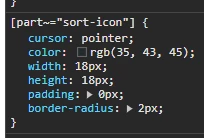
But this doesn't work for me. Could someone help me out?
The only help I found is this Article:
https://www.ptc.com/en/support/article/CS367980
But when I change the color of Labels in my Style Theme, all labels in my Application will change, that's not what I want.
I am looking for a CSS class that I can use on single grids.
Thank you!