
17-Peridot
January 9, 2023
Solved

Collection widget top and bottom margins

Hello,


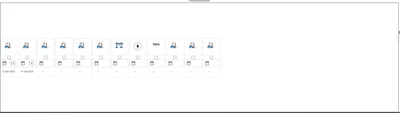
I have a collection widget with a few mashups in it;
 

jensc_0-1673278406000.png


But as you can see, for whatever reason the mashups start in the middle of the container.

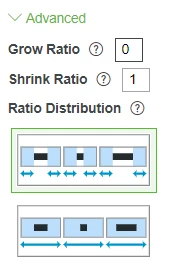
If I use the advanced size settings;
 

jensc_1-1673278560064.png

And set the growth ratio to 0, the collection widget itself disappears.

Is it even possible to have it start in the top left corner?

I assume it might be possible using CSS, but I would rather avoid using it.


Thanks,

Jens

12-Amethyst
January 9, 2023

Sorry for the vague response here but you will need to work with the properties of the collection widget and not the mashup layout.  There are  a lot of properties that will affect the layout and will take a bit of trial and error.  Assuming you collection layout is set to flow, take a look FlowLayoutXXXX dropdowns.


Thanks,


Travis

2 replies

12-Amethyst
January 9, 2023

Sorry for the vague response here but you will need to work with the properties of the collection widget and not the mashup layout.  There are  a lot of properties that will affect the layout and will take a bit of trial and error.  Assuming you collection layout is set to flow, take a look FlowLayoutXXXX dropdowns.


Thanks,


Travis

Translate
jensc17-PeridotAuthor
17-Peridot
January 10, 2023

Hello,


It seems like it was the FlowLayoutContentGravity that decided on where in the collection widget the row is, top, center or bottom.


Thanks,

Jens

Translate