16-Pearl
March 12, 2026
Question

Colored entries in Dropdown

  • March 12, 2026
  • 1 reply
  • 198 views

Dear community,


I would like to color the entries of a Dropdown, like this:
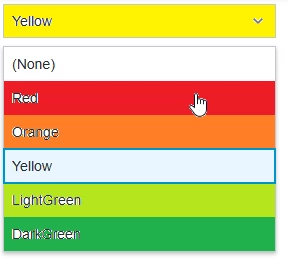
ColoredDropdown.png

The Color would come with the InfoTable for the data feed. Anyone an idea how to do this?


Thanks

Benny

1 reply

16-Pearl
March 12, 2026

Yes, this is possible in ThingWorx using State-based Style Definitions on the Dropdown widget.

You can configure it in the following way:

  1. Click the Dropdown widget and go to the List Format property.

  2. In the renderer configuration, select State-based Style Definitions.

  3. Choose the Dependent Field (this should be the field that contains the value coming from your InfoTable).

  4. Create a State Definition where you define all the colors you want to use.


please see attached screenshot.


In the State Definition, you need to configure:

  • Value – the value coming from your data (for example F1, F2, F3, etc.)

  • Display Name – the readable label for that value

  • Style – the style definition that contains the color you want to display

Make sure that the same values you defined in the State Definition (e.g., F1, F2, F3, etc.) are stored in the DataTable / InfoTable that you bind to the dropdown.

Then in the Dropdown configuration:

  • ValueField should point to the field that contains those values (F1, F2, F3, etc.)

  • DisplayField should be the field containing the text you want to show to the user (for example “Red”, “Yellow”, “Green”, etc.)

Once the dropdown receives the values from the InfoTable and they match the values defined in the State Definition, ThingWorx will automatically apply the corresponding color styles to the entries.


BennyB16-PearlAuthor
16-Pearl
March 12, 2026

Hey @MA8731174 ,


many thanks for your reply. I completely forgot about the StateDefinition. But it also does not fully cover my requirements. There is no chance to provide the color itself via the InfoTable, e. g. by Hex-Code, right?


Thanks

Benny