

pshashipreetham
18-Opal
18-Opal
October 23, 2021
Solved

Configure Grid Columns in Advanced Grid

  • October 23, 2021
  • 3 replies
  • 3421 views

Hi,

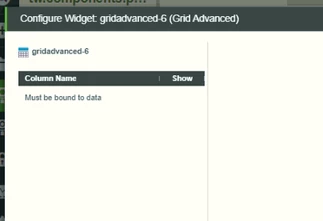
The Service(has datashape to) is binded to the Advanced Gird and can see the data in the Advance Grid, but when pressed on the Configure Grid Columns, it Says "Must be bound to data", not able to configure the columns

Thingworx version is 9.2
DeepinScreenshot_select-area_20211023132540.png
@paic @slangley @c_lowy 

Thanks,
Shashi.

Best answer by pshashipreetham

Hi,

This issue is due to the permission issues, proper permission should be given to the Mashup you are using, such that Gird Columns can be Configured. That's the reason, was not able to edit them after proper bindings and using Datashape because of the Permissions.

Thanks,
Shashi

3 replies

12-Amethyst
October 25, 2021

Hi,

Please double check that the data shape is defined in the output for the service returning the data.  If the data shape is not defined here you can not configure the advanced grid columns.


Thanks,


Travis

pshashipreetham
18-Opal
18-Opal
October 26, 2021

Hi @TravisPickett ,

Double Checked, the DataShape is present and the data can be seen in the Advance Grid, but not able to configure the Grid columns as shown in the picture !!

Thanks,
Shashi.

12-Amethyst
October 26, 2021

Hi @pshashipreetham,


One additional thing to check that I can think of without Tech Support getting involved is that if the binding of the result of the service to the advanced grid was done before the service had the data shape defined:

  • Refresh the data tab
  • Brake the binding to the advanced grid, Save, and then re-add the binding
  • Brake the binding to the advanced grid, removed the advanced grid, Save, then add the grid back
    • In rare cases I have had todo this before.


Another test you can do to validate the data shape is being returned is to add a dropdown widget.  Bind your result to this widget and if you look under properties for display and value you should see the data shape labels here.


Thanks,


Travis

Support
November 2, 2021

Hi @pshashipreetham.


If you feel the previous responses were helpful, please mark the appropriate one as the Accepted Solution for the benefit of others with the same question.


Regards.


--Sharon

Support
November 4, 2021

Hi @pshashipreetham.


Is it possible that you are populating the grid dynamically at runtime?  If you need to configure grid columns, you may have to change your design.  For example, you may have to create an infotable for loading your data before populating the grid.  This page from the Help Center may also provide another solution.


Regards.


--Sharon

pshashipreetham
18-Opal
pshashipreetham18-OpalAuthorAnswer
18-Opal
November 27, 2021

Hi,

This issue is due to the permission issues, proper permission should be given to the Mashup you are using, such that Gird Columns can be Configured. That's the reason, was not able to edit them after proper bindings and using Datashape because of the Permissions.

Thanks,
Shashi