1-Visitor
March 22, 2018
Solved

Create Dataset in Analyticsserver, SSLException: Unrecognized SSL message, planetext connectio

  • March 22, 2018
  • 1 reply
  • 2942 views
Hi,


I Am testing the Analytic Trial, I make the CSV and JSON download from the developer site (analytics_vibration - https://developer.thingworx.com/resources/guides/analytics-builder-quickstart/data-upload).

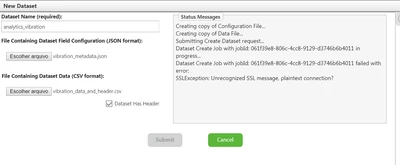
I Try to create a new dataset, I choose the files and click on submit, then the error below happens.


Untitled00.png


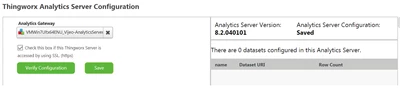
My Analytics Server configuration is like below.

Untitled.png


Obrigada.

Best answer by jessicalopo

Hi Christophe


I tried again without the SSL, but now I Unchecked the SSL access, restarted the server and tried again. Now it worked.

Before I did not restart the server.

Thank you.

Jessica

 

1 reply

19-Tanzanite
March 22, 2018

Hi


Could you confirm if your ThingWorx server is using https ?

Can you upload <ThingWorxAnalyticsServer>/config/analytics-server.properties and  <ThingWorxAnalyticsServer>/config/system-environment-variables.properties 


Thanks

Christophe


1-Visitor
March 22, 2018

Hi,


How can I confirm if i use HTTP or HTTPS?

For access the Composer I use only HTTP. I am using the trial version, so it's running on DockerMachine.

Follow attached the files.


Thanks.

19-Tanzanite
March 22, 2018

Hi


Ok so you are using HTTP.

In this case in ThingWorx Analytics Builder > Settings, uncheck the box for SSL access under the Thing Name since you are not using SSL.

Then save the settings and try again


Regards

Christophe