
10-Marble
December 11, 2018
Question

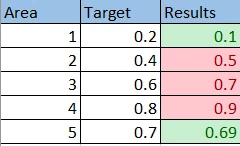
create one table with different style in the same column due to different targets

  • December 11, 2018
  • 7 replies
  • 3266 views

Hello All


I have one table with different targets i want color each cell with the right target if in or out

I have try but the grid give me only one style for the column , 

Do you have any Idea how it work?
 

 exa.PNG


7 replies

5-Regular Member
December 12, 2018

In Grid widget is allows RowFormat setting, you can define separate Styles based on different conditions of a selected column of data, but I think the style will apply to the entire row.

10-Marble
December 12, 2018

Hello Zyuan1,


Thanks for your Response


I know you can set on Style for Whole Row even the target is the same  but in my case I need Multi Style for multi Targets in the same Rows 


Regards,

Islam,

5-Regular Member
December 12, 2018

Click on Grid widget, expand the triangle on top left of the widget, open Configure Grid Columns

for each column, you can also assign different State Formatting