
5-Regular Member
March 21, 2024
Solved

Css changes not visible in modal popup for date picker and button widgets.

  • March 21, 2024
  • 1 reply
  • 797 views

Hi Community team,


I have two widgets one date picker and another one button to come up in modal popup but the css i have applied is not visible there which is showing up when I'm normally opening the popup mashup as in not from navigation.

 version is 8.5.7


Thanks,

Shraddha
Best answer by pshashipreetham

hi @shraddha_21 ,


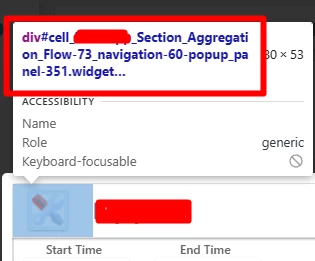
I face this problem daily, so for the CSS you have applied, you need to put the #root before it. The #root you will get it when you open the popup from runtime and do an inspection on it.. for example:

pshashipreetham_0-1711096058717.png

So you need write code like:

#cell_Section_Aggregation_Flow-73_navigation-60-popup_panel-351 {
 background: transparent;
 -ms-filter: progid:DXImageTransform.Microsoft.gradient(enabled=false);
 filter: none;
 border: none;
}

 Thanks,

1 reply

pshashipreetham
18-Opal
18-Opal
March 22, 2024

hi @shraddha_21 ,


I face this problem daily, so for the CSS you have applied, you need to put the #root before it. The #root you will get it when you open the popup from runtime and do an inspection on it.. for example:

pshashipreetham_0-1711096058717.png

So you need write code like:

#cell_Section_Aggregation_Flow-73_navigation-60-popup_panel-351 {
 background: transparent;
 -ms-filter: progid:DXImageTransform.Microsoft.gradient(enabled=false);
 filter: none;
 border: none;
}

 Thanks,