13-Aquamarine
August 5, 2025
Solved

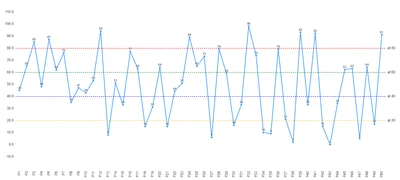
CSS for formatting the reference lines of a line chart

  • August 5, 2025
  • 2 replies
  • 897 views

@Jam_Kirko 

Could you possibly share the CSS for changing a reference line color if you still have it--from this topic?  

 

Best answer by Sathishkumar_C
@supports (ptcs-style-unit: "PTCS-CHART-COORD") {
 [part~="y-refline"]:nth-child(1){
 background: repeating-linear-gradient(to right, red, red 4px, transparent 5px, transparent 8px);
 width: 100%;
 height: 2px;
 }
 [part~="y-refline"]:nth-child(2){
 background: repeating-linear-gradient(to right, green, green 4px, transparent 5px, transparent 8px);
 width: 100%;
 }
 [part~="y-refline"]:nth-child(3){
 background: repeating-linear-gradient(to right, blue, blue 4px, transparent 5px, transparent 8px);
 width: 100%;
 } 
 [part~="y-refline"]:nth-child(4){
 background: repeating-linear-gradient(to right, rgb(243 192 17), rgb(243 192 17) 4px, transparent 5px, transparent 8px);
 width: 100%;
 } 
}

Sathishkumar_C_1-1758780636461.png


Try to use the above CSS.

2 replies

16-Pearl
August 6, 2025

Hi @JK_10744682   

  • Beginning with ThingWorx Platform 9.3.4, configuring different colors for reference lines is possible through Custom CSS code
@supports (ptcs-style-unit: "PTCS-CHART-COORD") {
 [part~="refline"]:nth-child(1){
 background-color:yellow;
 }
 [part~="refline"]:nth-child(2){
 background-color:red;
 }
}
13-Aquamarine
August 6, 2025

This is very helpful. Do you know of a way to get the colors to be by reference line number rather than coordinates? I want specific reference lines to be certain color but the CSS you showed has it so that the highest value line is one color and so on. 

17-Peridot
September 25, 2025
@supports (ptcs-style-unit: "PTCS-CHART-COORD") {
 [part~="y-refline"]:nth-child(1){
 background: repeating-linear-gradient(to right, red, red 4px, transparent 5px, transparent 8px);
 width: 100%;
 height: 2px;
 }
 [part~="y-refline"]:nth-child(2){
 background: repeating-linear-gradient(to right, green, green 4px, transparent 5px, transparent 8px);
 width: 100%;
 }
 [part~="y-refline"]:nth-child(3){
 background: repeating-linear-gradient(to right, blue, blue 4px, transparent 5px, transparent 8px);
 width: 100%;
 } 
 [part~="y-refline"]:nth-child(4){
 background: repeating-linear-gradient(to right, rgb(243 192 17), rgb(243 192 17) 4px, transparent 5px, transparent 8px);
 width: 100%;
 } 
}

Sathishkumar_C_1-1758780636461.png


Try to use the above CSS.