17-Peridot
March 31, 2023
Solved

Custom widget creation

  • March 31, 2023
  • 1 reply
  • 1296 views

Hello community,


I wanted to try out creating a custom widget so I installed the latest Eclipse version 2023-03.

I also downloaded the latest Eclipse plugin (9.0.1) and Thingworx extension SDK (9.3.0) and installed the plugin and used the SDK when creating the project.


Now for the JRE I am not so sure.

It says in the guide to use JRE 1.8. But I am not sure if I am actually using it.

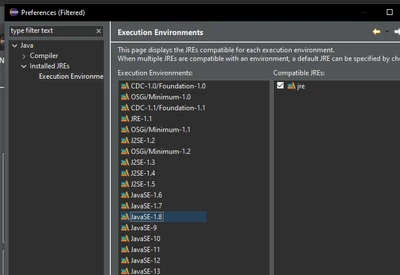
If I use the "Use default JRE 'jre' and worspace" option:

jensc_0-1680273874682.png

And I have configured it like this:

jensc_1-1680274005794.png

Is it using JRE 1.8?


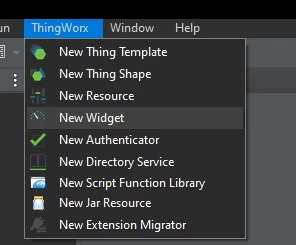
If I then create the project using these settings and try to add a new widget to the project:
jensc_2-1680274072053.png

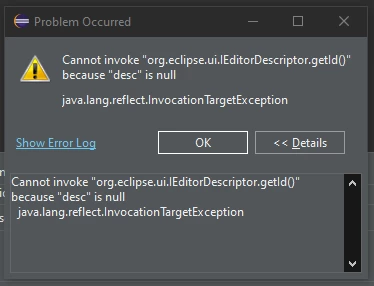
I get this error:

jensc_4-1680274107763.png

Error log:

jensc_5-1680274134978.png

(Here you can also see a bunch of other errors which I don't know if they are related or not).


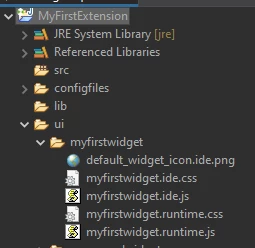
Now, I still do get some widget files in my project:
jensc_6-1680274211283.png

So maybe it's OK?


Creating other entities, like templates and script function libraries seems to work fine. At least they do not throw any errors.


Any ideas?

I will test the widget guide to completion next week to see if perhaps it does still work but wanted to get this post out there in case someone has a fix for the error.


Thanks,

Jens
 

Best answer by VladimirRosu_116627

Hello Jens,

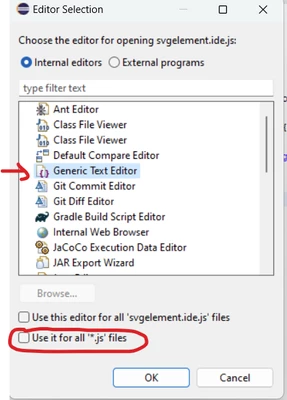
When adding a new widget, the extension will create automatically a bunch of JS and CSS files and will try to open the JS file in the current Eclipse editor for JS/CSS files.

However, as far as I have seen, a default editor for JS files is not set by default (I think Eclipse will try to use Window's editor for JS files and usually there's not one set; this is called the "System editor"), and this hidden issue will trigger that error message.

Right click on a JS file, Open With, Other and select your editor of choice.

VladimirRosu_0-1680602686872.png


1 reply

19-Tanzanite
April 4, 2023

Hello Jens,

When adding a new widget, the extension will create automatically a bunch of JS and CSS files and will try to open the JS file in the current Eclipse editor for JS/CSS files.

However, as far as I have seen, a default editor for JS files is not set by default (I think Eclipse will try to use Window's editor for JS files and usually there's not one set; this is called the "System editor"), and this hidden issue will trigger that error message.

Right click on a JS file, Open With, Other and select your editor of choice.

VladimirRosu_0-1680602686872.png


jensc17-PeridotAuthor
17-Peridot
April 4, 2023

Hello,


Ah I see, that makes sense. I did notice that it wasn't possible to open the .js (or .css?) files in eclipse.

In the end I just opened them directly from the folder in a different tool.

My guess is that even if I modify the files and save them in the original folder from a different program it will still work.


Thank you for your explanation!


Regards,

Jens

19-Tanzanite
April 4, 2023

I discovered this by mistake, fyi.

In my system these files are set to be opened in Windows by Visual Studio Code, and since Eclipse picks that setting as the default, once I click on them in Eclipse, VS Code opens :)))