
1-Visitor
June 3, 2022
Solved

Customizing date picker

  • June 3, 2022
  • 1 reply
  • 2332 views

Hey Guys,


Can anyone tell me how to apply custom css to date picker widget to change the background color of the buttons inside the date container(Done & Today).


Please refer the attachment. I wanted to change the default color to red .
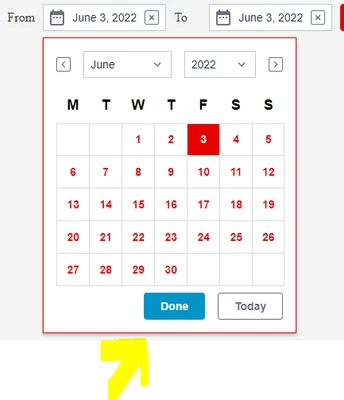
 

JANAKIRAMAN_P_0-1654260495445.png


Thanks,

Jan

Best answer by abjain

@JANAKIRAMAN_P : Please find attached entity for this . Basically you will have to inspect in chrome developer tools and find the element where CSS need to be applied. I have used the following CSS in the attached entity.

ptcs-datepicker-calendar::part(day){
color: red ;
}

1 reply

abjain15-MoonstoneAnswer
15-Moonstone
June 4, 2022

@JANAKIRAMAN_P : Please find attached entity for this . Basically you will have to inspect in chrome developer tools and find the element where CSS need to be applied. I have used the following CSS in the attached entity.

ptcs-datepicker-calendar::part(day){
color: red ;
}

1-Visitor
June 5, 2022

Hi @abjain ,


Thanks for your response, this helps.


--

Jan