16-Pearl
January 22, 2020
Solved

Data Filter widget with Datatable

  • January 22, 2020
  • 4 replies
  • 2653 views

Hi ,

I have DataTable with some records , i want to use Data filter widget .but when i binds filter widget to "All Data" in Datatable Service . its showing field names in filter widget but unable to filter data. i need proper reference on it. which service needs to bind and which needs to create new one. i have attached screenshots plz see this and give some steps how we can get it.


Thanks

Best answer by raluca_edu

Hi,


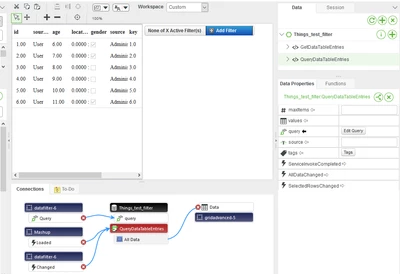
I recommend to use QueryDataTableEntries and create bindings in the following order:

- bind the Query from Data Filter to Query from Parameters of service QueryDataTableEntries

- Change event of filter  bind it with QueryDataTableEntries service


See below:

raluca_edu_0-1579771367785.png


Hope it helps,

Raluca Edu 

4 replies

raluca_edu
17-Peridot
January 23, 2020

Hi,


I recommend to use QueryDataTableEntries and create bindings in the following order:

- bind the Query from Data Filter to Query from Parameters of service QueryDataTableEntries

- Change event of filter  bind it with QueryDataTableEntries service


See below:

raluca_edu_0-1579771367785.png


Hope it helps,

Raluca Edu 

16-Pearl
January 23, 2020

Thank you very much . perfect !!

16-Pearl
January 26, 2020
Hi raluca_edu,

Could you please expain how it can be done in infotable. If you give me binding connections it would be better.
Thank you