

1-Visitor
November 19, 2018
Solved

Datetimepicker custom style

  • November 19, 2018
  • 1 reply
  • 2362 views

Hello there,

I am experimenting a bit with CustomCSS and wonder how to change styles of the popup of the Datetimepicker widget. I figured out how to change the styles of the buttons on the bottom but how can I style the calendar.


I tried to change the background color of the span with the attribute title="Monday" but it didn't work how I thought it would:
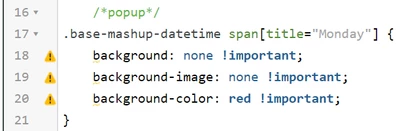
Screenshot (11).png


Could anyone help me with that? Is it even possible with custom css?


Best answer by wposner-2

The easiest way to do this is open your developer tools in chrome or safari (or browser of choice) and use the element selector to quickly find the HTML associated with the widget.  Then look at the styles associated with the different levels of HTML until you find the CSS that is directly affecting your widget.  Copy the div or class value from that level of the HTML in to your custom CSS and make sure you use the important! switch with your styles.

1 reply

wposner-21-VisitorAnswer
1-Visitor
November 19, 2018

The easiest way to do this is open your developer tools in chrome or safari (or browser of choice) and use the element selector to quickly find the HTML associated with the widget.  Then look at the styles associated with the different levels of HTML until you find the CSS that is directly affecting your widget.  Copy the div or class value from that level of the HTML in to your custom CSS and make sure you use the important! switch with your styles.

mplieske1-VisitorAuthor
1-Visitor
November 22, 2018

Thank you for your answer. I knew that before but somehow it worked with the copy selector functionality of chrome. Somehow it works with that selector but not with my selector.