Delete the Selected Row from the Grid in the Mashup
I have Created a MASHUP which has an GRID Widget which contains the data as shown in below figure:
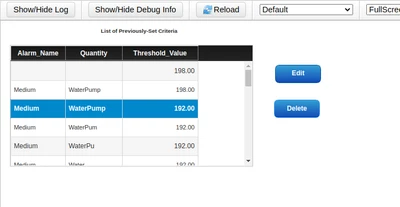
How Can I Delete the GRID Row on the Button "Delete" is pressed.
Thanks !!

I have Created a MASHUP which has an GRID Widget which contains the data as shown in below figure:

How Can I Delete the GRID Row on the Button "Delete" is pressed.
Thanks !!
Hi,
Got the Simple Solution,
1. Make Sure the Thing BaseTemplate is DataTable
2. Such that we can find lot of Services DeleteDataTableEntries, DeleteDataTableEntry and DeleteDataTableEntriesByKey.
3. For me the Row in the Grid got deleted for all the three services.
4. Create a Checkbox Column in the GRID and make it "Editable" and put the default value as False.
The Grid's Edited Table is the INPUT for the following Service
for (var i= 0;i<EditedTable.length;i++)
{
var row = EditedTable.rows[i];
if(row.CheckBox ===true)
{
var values = me.CreateValues();
values.Column1 = row.Column1;
values.Column2 = row.Column2;
values.Column3 = row.Column3;
values.Column4 = row.Column4;
var params1={
values:values
};
Things["DataTable_Name"].DeleteDataTableEntry(params1);
}
}
Enter your E-mail address. We'll send you an e-mail with instructions to reset your password.