
16-Pearl
June 27, 2019
Solved

Displaying weather info in google maps widget

  • June 27, 2019
  • 1 reply
  • 2765 views

It's probably a dumb question but just wondering if it's possible to display weather info in the google maps widget.  I use markers to display where our assets are located and would also like to display weather info in the area.  I followed the instructions in the link below to get weather info in json format and displayed it in html, but I was wondering if I can do this in the maps widget.

https://github.com/google/maps-for-work-samples/tree/master/samples/maps/OpenWeatherMapLayer


The following is a screenshot of the html:
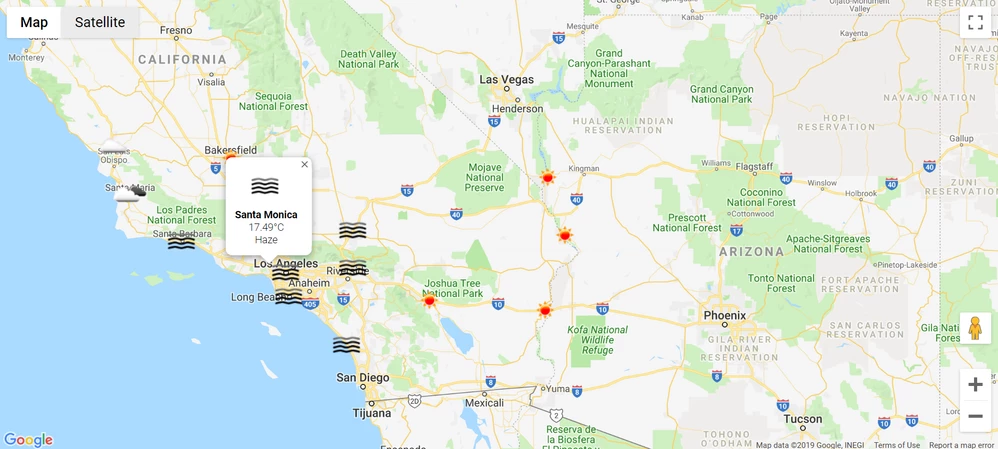
Thingworx - Weather Info in google maps html - 2019-06-27.PNG

Best answer by VladimirRosu_116627

I think you got it right. Make sure you test the Tooltip, because I remember they were text fields only (I don't remember if using an HTML link would produce an actual get, so you could link to a weather icon). 

The Mashup displayed on hover is the proper design, since it allows any kind of design in that hover popup.

In regards to the data, indeed, you can not use 2 datasets displayed at the same time in the map. Usually in cases such as this, we combine the 2 datasets and add another column that contains a combination between the device state and the other column we want to represent (for example, if you have 7 weather states and 2 device states (eg: online/offline), then that column would have a 14 possible value states). This approach is usable only in several scenarios, since it's not that scalable.

Taking the technical aspect aside, I suggest taking a look on the UI/UX experience, since you need to have clear value for the user of having on a map a set of 2 totally different datasets (devices and weather). Is it just nice to have, or the user needs to make some informed decision based on the weather presence?

1 reply

19-Tanzanite
June 28, 2019

Hi, yes, that is certainly doable, in 2 ways:
1. by displaying the weather information directly as the icon
2. display it on hover, as you shown in the example
For version 1: We do state based formatting (which is the feature that you want, it displays a different), based on a field called weather that you need to have/populate in your model.
For version 2: you need to create a small mashup that contains a mashup parameter (the weather "code"). You can use that mashup as a "hover mashup" in the Google Maps widget - it has a parameter for that, and pass the weather code to the mashup.
Ideally this guide can help https://developer.thingworx.com/resources/guides/google-map-widget-how

Willie16-PearlAuthor
16-Pearl
June 28, 2019

Hi @VladimirRosu_116627 , thank you for the suggestions.  I think it made what is possible and not possible clear to me.


For clarification purposes, what I want to do is to display both the markers for the assets and weather on the map at the same time without hovering over anything.  The asset markers would populate the map based on their coordinates.  The weather icon markers would populate on the map based on the coordinates of the 4 corners of the map, not the coordinates of the assets.  When I hover over a weather icon marker (sunny, cloudy, rain, etc), it would show more information like in the screenshot I embedded earlier.  <==I think this part is possible with the tooltip properties or tooltip mashup.  To have all this, my understanding is that I would need two sets of data which I don't think the google map widget allows.  


To confirm my understanding of the two versions...

Version 1: Based on the coordinates of the assets, instead of using the asset marker, use the weather icon as the marker.  To achieve this, use state-based formatting to display the different icons depending on the weather.

Version 2: Based on the coordinates of the assets, when hovering over the asset marker, use the tooltip properties to display the weather info.


So my understanding is that I probably would need to only use the coordinates of the asset and display the weather info as tooltip properties or tooltip mashup when I hover over the asset markers.  Is this correct?

19-Tanzanite
July 1, 2019

I think you got it right. Make sure you test the Tooltip, because I remember they were text fields only (I don't remember if using an HTML link would produce an actual get, so you could link to a weather icon). 

The Mashup displayed on hover is the proper design, since it allows any kind of design in that hover popup.

In regards to the data, indeed, you can not use 2 datasets displayed at the same time in the map. Usually in cases such as this, we combine the 2 datasets and add another column that contains a combination between the device state and the other column we want to represent (for example, if you have 7 weather states and 2 device states (eg: online/offline), then that column would have a 14 possible value states). This approach is usable only in several scenarios, since it's not that scalable.

Taking the technical aspect aside, I suggest taking a look on the UI/UX experience, since you need to have clear value for the user of having on a map a set of 2 totally different datasets (devices and weather). Is it just nice to have, or the user needs to make some informed decision based on the weather presence?