
10-Marble
March 31, 2022
Solved

dynamic color indicators based on the numeric value

  • March 31, 2022
  • 1 reply
  • 1641 views

Hi developers,


I'm working on a use case as shown in the images below. Need help with the implementation


Image A :

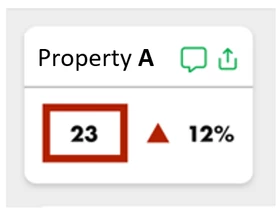
A cell in a collection widget to show the colored boxes and arrows to indicate that the property values is below a certain threshold values. The colors should be dynamic such that based on the values the outer box and arrow should change color like red, yellow, green
SK_10217546_0-1648705849921.png


 Image B : 

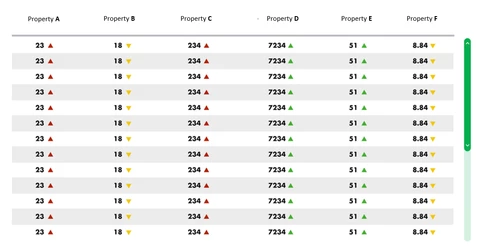
These are rows in a grid where cells have values along with a color arrow next to it to indicate the status. The colors should be dynamic such that based on the values the  arrow should change color like red, yellow, green
SK_10217546_1-1648706057964.png


Hope the use case was clear. 


Regards,

Saran

Best answer by PaiChung

not sure if it would work here, but state based definitions should allow you to include an icon as well.

https://support.ptc.com/help/thingworx/platform/r9/en/index.html#page/ThingWorx/Help/Composer/Visualization/StyleandStateDefinitions.html


1 reply

PaiChung22-Sapphire IAnswer
22-Sapphire I
March 31, 2022

not sure if it would work here, but state based definitions should allow you to include an icon as well.

https://support.ptc.com/help/thingworx/platform/r9/en/index.html#page/ThingWorx/Help/Composer/Visualization/StyleandStateDefinitions.html


10-Marble
April 5, 2022

Hi PaiChung,


Thanks for your reply. I tried using the state formatting and i was able to get the desired effect in the grid as shown in image b.


Could you give a solution for the first image effect where there is a red rectangle surrounding the number. 


Thanks,

Saran

22-Sapphire I
April 5, 2022

The red rectangle likely would require CSS or a different way of setting up the mashup using a collection widget.

I'm honestly not exactly sure how to approach that, since I'm not good with CSS