16-Pearl
May 16, 2025
Solved

Dynamically Scale a Picture Based on Widget Dragging (Left = Zoom In / Right = Zoom out)

  • May 16, 2025
  • 1 reply
  • 1642 views


Hi everyone,

I’m working on a UI feature in ThingWorx Mashup and was wondering if something like the following is possible:

šŸ‘‰ I have a layout where a picture (or model view) is shown on one side, and I want to dynamically change its size based on how I drag a divider or a panel.

  • When I drag the divider to the left (making the picture area larger), the image or 3D model should grow (scale up).

  • When I drag it to the right (making the area smaller), it should shrink accordingly.

The idea is to simulate a sort of "zoom effect" by using the container resizing rather than zooming through buttons or manual controls.

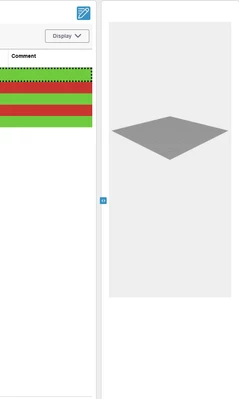
šŸ“· Here's a screenshot for visual context:
(Attached image showing the mashup and panel layout with the drag area)

Has anyone tried implementing something like this before?

  • Is it possible to bind the widget size or scaling dynamically to container resizing in ThingWorx?

  • Or is there a workaround with CSS or JS injection?

Any ideas or tips would be greatly appreciated!

Thanks in advance!
 

MA8731174_0-1747372201867.png


Best answer by nmutter

I tried a little but did not find the "perfect" solution. Attached one kinda works with collection mode "table" - to some extend. Max size is limited by "cell height", which also needs to fit the screen.

nmutter_0-1749036533535.png

Maybe it helps.

I also found https://community.ptc.com/t5/ThingWorx-Developers/Making-a-collection-responsive/td-p/732023 which has similar question but also not the perfect solution.

1 reply

16-Pearl
May 16, 2025

With a Image you can achieve what you want

nmutter_0-1747393676722.png

At least this is what I think you want? Not sure if your right widget for 3d viewer supports such options (position + scaling)?

nmutter_1-1747393827985.png


MA873117416-PearlAuthor
16-Pearl
May 16, 2025

Thank you for your reply! As you can see that this is a dynamic panel and in which i have collection and these collection have images. It can be more then one images there also. 


MA8731174_0-1747394243725.png


16-Pearl
May 26, 2025

Okay. Not so sure. I did not find a bindable width property of the dynamic panel, which one could use as width for the collection tiles.

Also not sure how the tiles would resize when using the collection-widget setting 'UseMashupDimensions' and letting the mashup be responsive.

Other than that I would not have another idea currently.. Would need to try how the behavior is - but maybe you already tried that...