17-Peridot
February 20, 2023
Solved

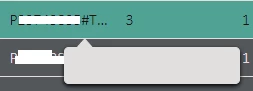
Empty grid tooltip

  • February 20, 2023
  • 1 reply
  • 1947 views

Hello,


I was wondering if perhaps someone on here knew why my overflow tooltips do not work:

jensc_0-1676880438147.png

I can't seem to find any settings for it other than these:

jensc_0-1676882377151.png

So if anyone could point me in the right direction, that'd be highly appreciated!


Thanks,

Jens

Best answer by DanZ

I'm also just realizing that inspection with dev tools is easier said than done. I just saw that you can at least find the tooltip text under "aria-label" on the element.

In example for a button with a tooltip "Search entities": 

<ptcs-button class="ptcs-wrapper widget-content widget-ptcsbutton" tabindex="0" id="root_pagemashupcontainer-5_ptcsbutton-280" variant="primary" icon-placement="left" content-align="center" role="button" mode="icon" aria-disabled="false" aria-label="Search entities"></ptcs-button>


To style the tooltips you have a small section in the StyleTheme for it: Elements -> Information -> Tooltips.

1 reply

15-Moonstone
February 21, 2023

Just to be sure: Have you checked the tooltip with the Dev-Browsertool? Is the contained text missing or does it simply have the same color as the background?

jensc17-PeridotAuthor
17-Peridot
February 21, 2023

Hello @DanZ ,


I've tried to figure out how to check this in the dev tools, but have not been able to even using the "force state:hover".

Could you perhaps point me in the right direction?


I also do not believe there is any OOTB style property to change the tooltip text color...


Thanks,

Jens

DanZ15-MoonstoneAnswer
15-Moonstone
February 22, 2023

I'm also just realizing that inspection with dev tools is easier said than done. I just saw that you can at least find the tooltip text under "aria-label" on the element.

In example for a button with a tooltip "Search entities": 

<ptcs-button class="ptcs-wrapper widget-content widget-ptcsbutton" tabindex="0" id="root_pagemashupcontainer-5_ptcsbutton-280" variant="primary" icon-placement="left" content-align="center" role="button" mode="icon" aria-disabled="false" aria-label="Search entities"></ptcs-button>


To style the tooltips you have a small section in the StyleTheme for it: Elements -> Information -> Tooltips.