17-Peridot
April 21, 2023
Solved

Entity XML "Universal=password"

  • April 21, 2023
  • 3 replies
  • 2248 views

Hello Communtiy,


For some time now I have been using the "Export as Source Control Entities" function and SourceTree when I want to save something in our internal source control system.


However some of my colleagues use the PTC(?) built Git Mashup for the same functionality.


What I have noticed is that when someone has used the Git Mashup for source control, the XML contains a "password" in the <Entities> universal tag.

But when I have exported it using the Source Control Entities function the <Entities> universal tag is empty.


This causes some quite annoying issues when trying to actually see what has been changed between commits as every single entity now looks changed.


Does anyone have any ideas on what causes this?


I suppose as a workaround I could add the "password" value in the tags manually. But if possible I would rather not.


Thanks,

Jens

Best answer by jensc

Hello Community,


We think we have narrowed it down to some bug in the export and zip functionality of Thingworx:

jensc_1-1683123617631.png


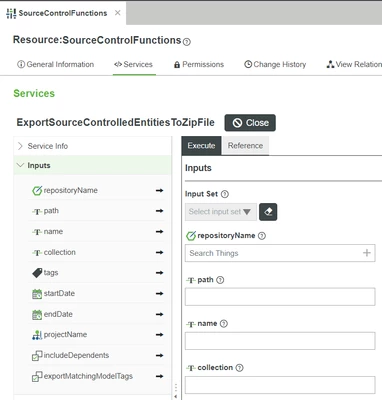
What we found is that the following service also has the exact same issue (so perhaps same code is used for the export to zip file in the export function).

jensc_0-1683123599768.png


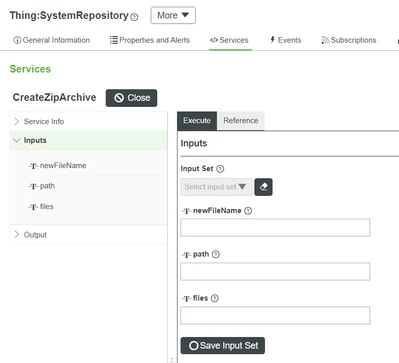
For now, the workaround will be to first export the project to a repository and from there zip it manually using the CreateZipArchive on any repository:

jensc_2-1683123765591.png


And then downloading the zipped file manually.


Regards,

Jens

3 replies

16-Pearl
April 25, 2023

Hi @jensc, you may have noticed on the ThingWorx Help Center page regarding "exporting as source control entity" that all sensitive information, such as a password, will be cleared when doing so:

When exporting entities via source control, sensitive information such as password hashes or application key IDs associated with the entity are not exported. Importing the source control export back into the system will cause the loss of any sensitive information associated with the entity.

http://support.ptc.com/help/thingworx/platform/r9/en/#page/ThingWorx/Help/Getting_Started/ImportingandExportinginThingWorx/ImportingandExportingDataEntitiesandExtensions.html

And yes, I think you should reenter the password value to make the related functionality work.


Hope this helps.

jensc17-PeridotAuthor
17-Peridot
April 25, 2023

Hello @CharlesJi,


Yes, I understand that passwords and other sensitive data in properties will be lost when exporting entities.

However, this is not a property, it is just an XML tag: 

jensc_0-1682403594698.png


Now, I realize that the GitBackup extension is not supported by PTC so perhaps it would be better to open an issue on github for this.

My understanding anyway is that this extension also uses something similar (or the same thing) as "export to source control". But it seems like my understanding is wrong.


I'll leave the post open for some more time in case someone knows anything about it.


Thanks,

Jens

19-Tanzanite
April 25, 2023

Hi Jens,


I would be happy to respond to this over https://github.com/PTCInc/thingworx-gitbackup-extension/issues , as you correctly detected 😄


jensc17-PeridotAuthor
17-Peridot
April 27, 2023

Hello,


I have opened a case with PTC to see if we can figure out why this happens.

Once this case is done I'll update this post with the results.


Regards,

Jens

jensc17-PeridotAuthorAnswer
17-Peridot
May 3, 2023

Hello Community,


We think we have narrowed it down to some bug in the export and zip functionality of Thingworx:

jensc_1-1683123617631.png


What we found is that the following service also has the exact same issue (so perhaps same code is used for the export to zip file in the export function).

jensc_0-1683123599768.png


For now, the workaround will be to first export the project to a repository and from there zip it manually using the CreateZipArchive on any repository:

jensc_2-1683123765591.png


And then downloading the zipped file manually.


Regards,

Jens

19-Tanzanite
May 4, 2023

Thanks! I guess I did not pay attention to the name of the Service you called, specifically the "ToZipFile". I tested this and I confirm I see this issue also in 9.3.8