
1-Visitor
August 10, 2017
Question

error while installing Docker for Thingworx analytics server

Hello,

We want to install Thingworx analytics 8 server  on windows 7 of desktop grade machine.

As per installation guide ,Docker toolbox is downloaded and  installed on same machine of windows 7.

After installing when we are running command of  Docker info, its throwing error  as below..
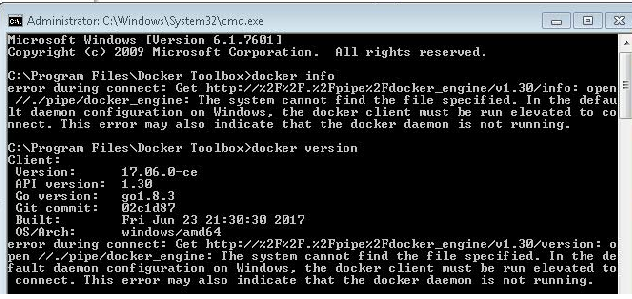
any other tools has to be installed or other settings we have to check?

Please help.

Regards,

Raji.

    17 replies

    1-Visitor
    August 10, 2017

    Run the Docker Quickstart Terminal. installed with Docker to check the version.

    Translate
    rvuta11-VisitorAuthor
    1-Visitor
    August 11, 2017

    Hi Harish,

    Here we want to check docker on windows has installed properly or not.As we are facing error while installing analytics server.

    That's why we ran Docker version command.

    As it is throwing error ,we assumed docker not installed properly.

    below is the error we are getting while installing Analytics server.

    Regards,

    Raji.

    Translate
    1-Visitor
    August 11, 2017

    Raji,

    Your first post indicate that  you are  using  Docker version  17.06.0.CE. I second post 17.03.0.ce.  I would suggest to uninstall all the installed versions

    • Uninstall Docker Toolbox using Window's standard process for uninstalling programs through the control panel (programs and features). ...
    • remove the C:\Users\<your-user>\.docker directory. ...
    • remove the C:\Users\<your-user>\AppData\Roaming\DockerToolbox
    • Uninstall Oracle VirtualBox, which is installed as a part of the Toolbox install.

    Download  & Install the latest version of Docker.  After installation,  Run the Docker quick start terminal and than run the version command.

    Translate
    12-Amethyst
    September 11, 2017

    Quick question, are you installing on a virtual PC or a physical machine.

    On both, you should have VT-X/AMD-v enabled in BIOS. For a virtual PC, this can be a problem.

    I had the same error with the docker_machine_validator.exe because of this.

    Translate
    1-Visitor
    September 12, 2017

    Hello ,

            I am trying to install it on physical machine .I went into the BIOS Setup and check the setting for virtualization it was enabled .

    1.BIOS1.PNG

    2.

    BIOS2.PNG

    Thanks For Replying

    Kind Regards ,

    Amar.

    Translate
    12-Amethyst
    September 12, 2017

    Hi, seems to be ok, although this depends on your hardware of course

    Virtualization needs to be enabled, to be able to run the virtual docker server.

    For me it was the reason the docker_validator.exe failed, because I was running it on a VMWare Virtual PC on ESX.

    Check also this post: Re: Thingworx Analytics Installation Issue

    Translate