
1-Visitor
November 18, 2020
Solved

Error while installing Thingworx foundation 90 days trial

  • November 18, 2020
  • 1 reply
  • 4636 views

Hi

I'm not able to install thingworx 9.0 version 90days trail fro windows , facing below error,
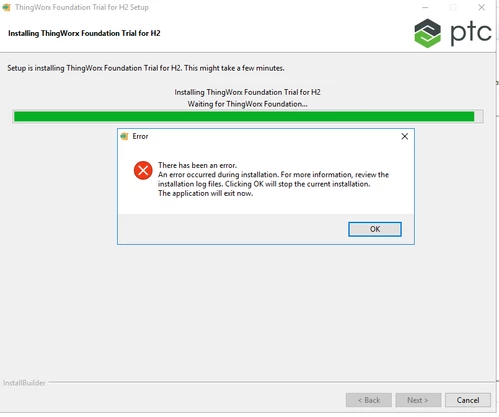
aws.png

I have attached environment variable image and all log file please suggest where I was wrong.

Best answer by DT_9697337

I have reinstall my system OS  it is now working and successfully installed, But I thing this is not right way to clean your OS and reinstall again while facing such Thingworx installation issue.
It must have another way to install without doing unistalled your system OS.

1 reply

Community Manager
November 18, 2020

Hi @DT_9697337.


Here are some things to check:

  • You need to put JAVA_HOME under System environment variables
  • Do you have multiple version of Java installed?  I see this on line 18 of the bitrock installer log:

[16:16:39] - HOST_JAVA_HOME path: C:\PROGRA~1\Java\JDK18~1.0_2\jre...


  • Are you running the installer as Administrator?

Please let us know if you continue to have issues.


Regards.


--Sharon

1-Visitor
November 19, 2020
  • You need to put JAVA_HOME under System environment variablesI did this oath and tried but it gives me same error
  • Do you have multiple version of Java installed?  I see this on line 18 of the bitrock installer log:I dont have more java installed on my system, only one i have installed jdk 1.8.0_251, Also i have attached my environment variable setting image please check.
  • Are you running the installer as Administrator?Yes, I tried with run as Administrator but it gives me same error.

Please suggest me the right way i'm trying from last 4 days.


1-Visitor
November 23, 2020

Anyone here for help how to solve this problem,I am facing this error.

  • You need to put JAVA_HOME under System environment variables

I did this oath and tried but it gives me same error

  • Do you have multiple version of Java installed? I see this on line 18 of the bitrock installer log:

I dont have more java installed on my system, only one i have installed jdk 1.8.0_251, Also i have attached my environment variable setting image please check.

  • Are you running the installer as Administrator?

Yes, I tried with run as Administrator but it gives me same error. Please suggest me the right way i'm trying from last 4 days.