1-Visitor
July 4, 2019
Solved

errors when using filter query

  • July 4, 2019
  • 1 reply
  • 1321 views
var query = 
{
 "filters": {
 "type": "EQ",
 "fieldName": "Kategory",
 "value": "Quality"
 }
}; 

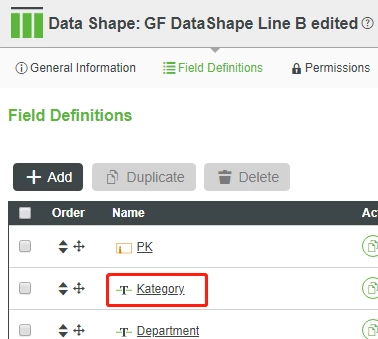
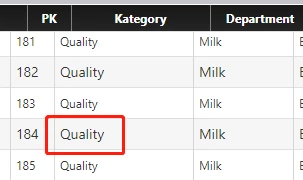
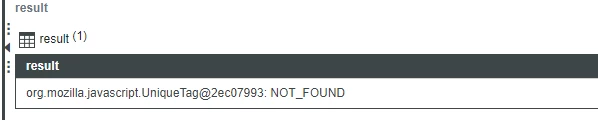
data shape.pngdata table.pngnot found.png

here is a question for using query filter. when I custom the service, there is an error appearing in the result. Could Someone can help me to fix this problem and what is the output should I choose. Now I chose "STRING"
"

Best answer by Rajesh_Sayana

I see that you are trying to query a DataShape type entity. I would try creating an infotable from the Datashape.

var params = {
 infoTableName : "InfoTable",
 dataShapeName : "InputYourDatashapeNameHere"
};

// CreateInfoTableFromDataShape(infoTableName:STRING("InfoTable"), dataShapeName:STRING):INFOTABLE(TestDS)
var inputforFilter = Resources["InfoTableFunctions"].CreateInfoTableFromDataShape(params);

Populate the created Infotable with the values you would like to filter/query upon. Use the EQFilter to query the infotable as below.

var filterparams = {
	fieldName: "Kategory" /* STRING */,
	isCaseSensitive: false /* BOOLEAN */,
	t: inputforFilter /* INFOTABLE */,
	value: "Quality" /* STRING */
};

// result: INFOTABLE
var result = Resources["InfoTableFunctions"].EQFilter(filterparams);

The output of the service should be an infotable with the same datashape that you are querying on. Please let me know if you run into any issues. 

1 reply

5-Regular Member
July 11, 2019

I see that you are trying to query a DataShape type entity. I would try creating an infotable from the Datashape.

var params = {
 infoTableName : "InfoTable",
 dataShapeName : "InputYourDatashapeNameHere"
};

// CreateInfoTableFromDataShape(infoTableName:STRING("InfoTable"), dataShapeName:STRING):INFOTABLE(TestDS)
var inputforFilter = Resources["InfoTableFunctions"].CreateInfoTableFromDataShape(params);

Populate the created Infotable with the values you would like to filter/query upon. Use the EQFilter to query the infotable as below.

var filterparams = {
	fieldName: "Kategory" /* STRING */,
	isCaseSensitive: false /* BOOLEAN */,
	t: inputforFilter /* INFOTABLE */,
	value: "Quality" /* STRING */
};

// result: INFOTABLE
var result = Resources["InfoTableFunctions"].EQFilter(filterparams);

The output of the service should be an infotable with the same datashape that you are querying on. Please let me know if you run into any issues.