

ESP8266 Communicate with Thingworx
Hi, Team!
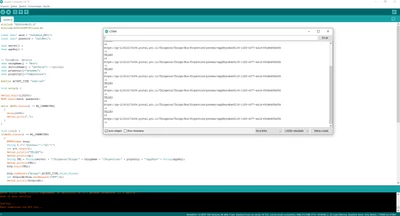
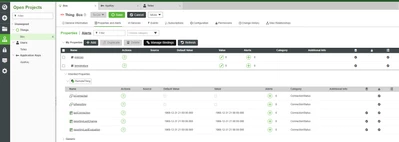
I work with these sketch but the TW don´t receive any data.
Follow two printscreens.
#include "ESP8266WiFi.h"
#include<ESP8266HTTPClient.h>
const char* ssid = "InfoAxis_NET1";
const char* password = "InfoNet1";
char server[] = "xxxx";
char appKey[] = "xxxx";
// ThingWorx details
char thingName[] = "Box";
char serviceName[] = "setValue"; //optional
char property1[]="pressao";
char property2[]="temperatura";
#define ACCEPT_TYPE "text/csv"
void setup() {
Serial.begin(115200);
WiFi.begin(ssid, password);
while (WiFi.status() != WL_CONNECTED)
{
delay(1000);
Serial.print(".");
}
}
void loop() {
if(WiFi.status() == WL_CONNECTED)
{
HTTPClient http;
String t ="{\"pressao\":\"40\"}";
int a=t.length();
Serial.println("TELLES");
Serial.println(a);
String URL = String(server) + "/Thingworx/Things/" + thingName + "/Properties/" + property1 + "?appKey=" + String(appKey);
Serial.println(URL);
http.begin(URL);
http.addHeader("Accept",ACCEPT_TYPE,false,false);
int httpcode=http.sendRequest("PUT",t);
Serial.println(httpcode);
if(httpcode > 0)
{
String payload = http.getString();
Serial.println(payload);
String t1="{\"temperatura\":\"56\"}";
int a1=t1.length();
Serial.println(a1);
String URL = String(server) + "/Thingworx/Things/" + thingName +"/Properties/" + property2 + "?appKey=" + String(appKey);
http.begin(URL);
http.addHeader("Accept",ACCEPT_TYPE,false,false);
http.addHeader("Content-Type","application/json",false,false);
int httpcode=http.sendRequest("PUT",t1);
if(httpcode > 0)
{
String payload = http.getString();
Serial.println(payload);
}
http.end();
}
delay(1000);
}
}
Perhaps I´m skipping some steps.
Regards.
Telles.