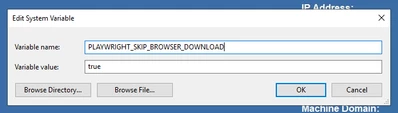
Executed the create PDF logic on screen successfully, but I see an error in Application log.
Hi
I have used your extension and when I executed the create PDF logic, it executed without any error on the screen but I see the below error in Application log.
Could you please help me out on this.
Error {_ message='Chromium distribution 'msedge' is not found at C:\Windows\ServiceProfiles\NetworkService\AppData\Local\Microsoft\Edge\Application\msedge.exe_Run "mvn exec:java -e -D exec.mainClass=com.microsoft.playwright.CLI -D exec.args="install msedge""_ name='Error_ stack='Error: Chromium distribution 'msedge' is not found at C:\Windows\ServiceProfiles\NetworkService\AppData\Local\Microsoft\Edge\Application\msedge.exe_Run "mvn exec:java -e -D exec.mainClass=com.microsoft.playwright.CLI -D exec.args="install msedge""_ at executablePath (C:\PROGRA~2\THINGW~1\tomcat\apache-tomcat-9.0.82\temp\playwright-java-13289891056474302043\package\lib\server\registry\index.js:521:13)_ at Object.executablePathOrDie (C:\PROGRA~2\THINGW~1\tomcat\apache-tomcat-9.0.82\temp\playwright-java-13289891056474302043\package\lib\server\registry\index.js:529:43)_ at Chromium._launchProcess (C:\PROGRA~2\THINGW~1\tomcat\apache-tomcat-9.0.82\temp\playwright-java-13289891056474302043\package\lib\server\browserType.js:174:39)_ at async Chromium._innerLaunch (C:\PROGRA~2\THINGW~1\tomcat\apache-tomcat-9.0.82\temp\playwright-java-13289891056474302043\package\lib\server\browserType.js:105:9)_ at async Chromium._innerLaunchWithRetries (C:\PROGRA~2\THINGW~1\tomcat\apache-tomcat-9.0.82\temp\playwright-java-13289891056474302043\package\lib\server\browserType.js:86:14)_ at async ProgressController.run (C:\PROGRA~2\THINGW~1\tomcat\apache-tomcat-9.0.82\temp\playwright-java-13289891056474302043\package\lib\server\progress.js:92:22)_ at async Chromium.launch (C:\PROGRA~2\THINGW~1\tomcat\apache-tomcat-9.0.82\temp\playwright-java-13289891056474302043\package\lib\server\browserType.js:63:21)_ at async BrowserTypeDispatcher.launch (C:\PROGRA~2\THINGW~1\tomcat\apache-tomcat-9.0.82\temp\playwright-java-13289891056474302043\package\lib\server\dispatchers\browserTypeDispatcher.js:35:21)_ at async DispatcherConnection.dispatch (C:\PROGRA~2\THINGW~1\tomcat\apache-tomcat-9.0.82\temp\playwright-java-13289891056474302043\package\lib\server\dispatchers\dispatcher.js:319:22)_}