8-Gravel
December 13, 2023
Question

False alarm triggering and misdata in dababase due to loss of precision of floating-point type data

  • December 13, 2023
  • 2 replies
  • 2915 views

Dears,

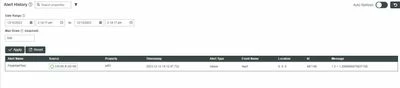
     as screenshoots below, when a simulated float transferred from kepware to thingworx, 1.2 turns to 1.2000000476837158, so a false alarm triggered. Misdata logged in influxdb as well.

  • a simulated float which is 1.2 on kepware

20231213-143539.jpg

  • but on thingworx that turns to 1.2000000476837158
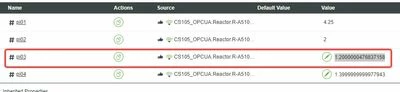
20231213-143723.jpg

alarm triggered when property is above 1.2
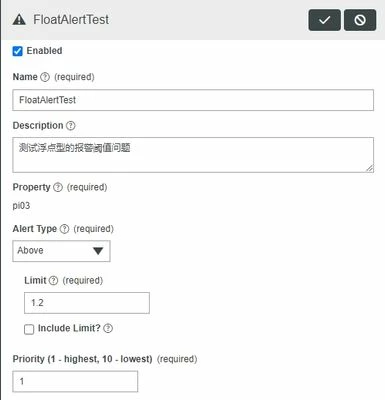
20231213-143854.jpg

  • So a false alarm triggered

20231213-144003.jpg


I can't change data restricted to external audit, what can I do to modify the data to the correct.

2 replies

Rocko
19-Tanzanite
December 14, 2023

Have you made sure that the value on Kepware really is 1.2 and not 1.2000000476837158 just being displayed as 1.2 in the Quick Client?


LeoChen8-GravelAuthor
8-Gravel
December 15, 2023

check property in qc, it is 1.2

20231215-093048.jpg

Or try to write 1.2 to this remote tag on thingworx, value also turns to 1.2000000476837158

  • write 1.2 to the tag
  • 20231215-093509.jpg

     Then value turns to 1.2000000476837158

20231215-093514.jpg

 floate points has the question.

Rocko
19-Tanzanite
December 15, 2023

This is actually expected behaviour and a consequence of using float type in Kepware instead of double.

Check this article for reference: https://www.ptc.com/en/support/article/CS341193

https://www.h-schmidt.net/FloatConverter/IEEE754.html

To work around this, use double in Kepware or transform your variable in TWX with toFixed.

16-Pearl
December 26, 2023

Hi @LeoChen ,

It appears that the previous reply by Rocko answers your question.  For the benefit of other Community Members who may have the same question, it would be great if you could designate it as the Accepted Solution.

In the event that this response did not answer your question, please post your current status so that we can continue to support.

Thanks for using the PTC Community!

Regards,

Tony