17-Peridot
February 17, 2023
Solved

File upload no repository

  • February 17, 2023
  • 2 replies
  • 1186 views

Hello,


One of my users has started facing a strange problem since our upgrade from 9.1 to 9.3 with the file upload widget.


The upload always fails with a response of "bad request".

Looking into the dev tool a bit more I noticed:
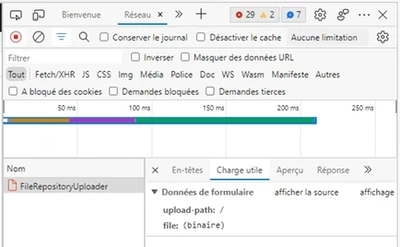
jensc_0-1676624202397.png

There is no "upload-repository" in the payload.


I have tried the same upload widget with my own user and can't replicate the issue:
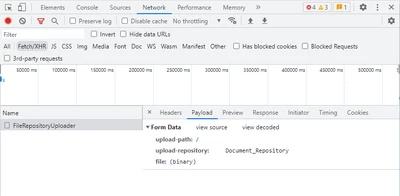
jensc_1-1676624296418.png

As you can see I do get the "upload-repository" in my payload.


I have checked and the user does have permissions to the repository, both visibility and run time.

They do not have design time permissions set though, perhaps something has changed between 9.1 and 9.3 that would require design time permissions for repositories now?


If anyone has had the same problem and found a solution, please write a post here.

Eventually I'll open a ticket with PTC and if they can find the issue I'll report the solution here.


Thanks,

Jens

Best answer by jensc

Hello,


I eventually found the issue after digging deeper into the errors in the application log saying that that the "SeachFunctions" Entity was not found.


Apparently the File upload widget uses the "SearchFunctions" entities "SearchThingsByTemplate" service to get the repositories existing on the platform for use in the repository selector:

jensc_0-1676635545325.png

jensc_1-1676635570290.png

And if the user does not have visibility to the entity and run time permissions for the service, no repositories will be shown in the dropdown list.

I suppose this makes sense, however it still seems like a bug that if you have set a default repository in the file upload widget properties:

jensc_2-1676635717560.png

That it wouldn't use this automatically, especially if you have disabled the previously stated "ShowRepositorySelector" property.


But at least I found the issue and can continue, and I hope that PTC might fix this in the future unless it "works as designed".

For now I'll mark this post as solved if anyone else comes across the same issue.


Thanks,

Jens


2 replies

jensc17-PeridotAuthor
17-Peridot
February 17, 2023

I found some more information in the application logs:

jensc_0-1676629078595.png

And these, which I am not entirely sure are related:

jensc_1-1676629169750.png


jensc17-PeridotAuthorAnswer
17-Peridot
February 17, 2023

Hello,


I eventually found the issue after digging deeper into the errors in the application log saying that that the "SeachFunctions" Entity was not found.


Apparently the File upload widget uses the "SearchFunctions" entities "SearchThingsByTemplate" service to get the repositories existing on the platform for use in the repository selector:

jensc_0-1676635545325.png

jensc_1-1676635570290.png

And if the user does not have visibility to the entity and run time permissions for the service, no repositories will be shown in the dropdown list.

I suppose this makes sense, however it still seems like a bug that if you have set a default repository in the file upload widget properties:

jensc_2-1676635717560.png

That it wouldn't use this automatically, especially if you have disabled the previously stated "ShowRepositorySelector" property.


But at least I found the issue and can continue, and I hope that PTC might fix this in the future unless it "works as designed".

For now I'll mark this post as solved if anyone else comes across the same issue.


Thanks,

Jens