
14-Alexandrite
December 15, 2025
Solved

File Upload widget custom styling (Thingworx 9.6)

  • December 15, 2025
  • 2 replies
  • 419 views

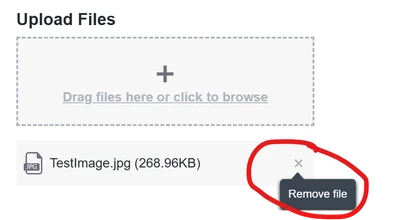
When I upload a file, it shows the file below with an "x" to remove the file as well. However, I need to remove this "x" because there is no bindable event to removing an item. Instead, I have a button to clear the items which then triggers some other services. 


How do I remove the "x" button from this widget as shown below? Thingworx 9.6
JO_9930585_0-1765831799597.png


Best answer by Rocko

add custom css to the mashup:

@supports (ptcs-style-unit: "PTCS-FILE-UPLOAD-LIST-ITEM") {
[part=hit-area] {
display:none;
}
}


you probably need to disable linting which will keep you from saving.

2 replies

Rocko
19-Tanzanite
December 17, 2025

The x removes the file from the list of files to be uploaded, in case you accidentally added something to the list. It does not need to be bound to work.

14-Alexandrite
December 18, 2025

As stated, I have services that need to be triggered once the file is cleared from the widget and there is not bindable event to call these services when the "x" is clicked. I went into more detail below.

17-Peridot
December 17, 2025

Hello @JO_9930585 ,


As Rocko, indicated the "X" is used to update the file which is selected for Upload.  It is has no other action then to remove the selected file name from the widget. 
In your post you indicate that you have a button which does this action. What other operations are required for removing the file selected in the widget.


Regards,

Pehowe

14-Alexandrite
December 18, 2025

When a user clicks the "x" it removes the file from the list as stated. I have a webframe directly below this that shows the file that has been selected. The "x" does NOT have a bindable event to clear this webframe when it is clicked. Therefore, I am using a button to clear the file. However, the "x" is still visible which is not desirable since it is not useable. Also, the file upload widget is disabled after a single file is uploaded which gives the "x" button no functionality. This is great, but it is still visible.

JO_9930585_0-1766071581049.png


Rocko
Rocko19-TanzaniteAnswer
19-Tanzanite
December 18, 2025

add custom css to the mashup:

@supports (ptcs-style-unit: "PTCS-FILE-UPLOAD-LIST-ITEM") {
[part=hit-area] {
display:none;
}
}


you probably need to disable linting which will keep you from saving.