
4-Participant
November 26, 2024
Solved

Fileupload widget Uploaded file style

  • November 26, 2024
  • 1 reply
  • 979 views

I have the following file upload widget and i want to edit the background of the uploaded file part.
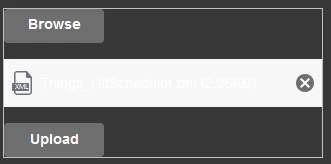
immagine.png


I have tried using the custom css  and setting list-item in the customClass property


.list-item::part(file-item) {
 background:#383838;
}


 following the ptc documentation I tried also this


@supports (ptcs-style-unit: "PTCS-FILEUPLOAD") {
 [part=file-item] {
	background-color: #383838; 
 }
}


but all my test failed to edit the style of that part

Best answer by wcui

@RC_9962782 

can you try below code?


@supports(ptcs-style-unit:"PTCS-FILE-UPLOAD-LIST-ITEM"){
   [part~=file-item] {
       background: red;
   }
}
 

1 reply

16-Pearl
November 28, 2024

@RC_9962782 what is the version of your ThingWorx instance? 

We would like to know which area you would like to change the BK color, a demo mashup might be helpful.

4-Participant
November 28, 2024

The thingworx version is 9.6.0

The area that I want to change the background is the one that opens after I selected a file. The area that has the white background in the screen in the original question.

I linked a demo mashup

wcui16-PearlAnswer
16-Pearl
November 29, 2024

@RC_9962782 

can you try below code?


@supports(ptcs-style-unit:"PTCS-FILE-UPLOAD-LIST-ITEM"){
   [part~=file-item] {
       background: red;
   }
}