
6-Contributor
December 11, 2018
Question

Generated Thingpredictor-[Model Name]-AnalysisThing not working programmatically with service

  • December 11, 2018
  • 1 reply
  • 2857 views

Hello,

we successfully generated a Thingpredictor-[Model Name]-AnalysisThingTemplate via the TW Analytics Manager.

Then we created a Thing from this ThingTemplate in Thingworx.

We have the following properties provided:

 

thing.png


If we manually add a new row in the data infotable it works and analytics executes an analysis job (also it generates a key id as you can see here):
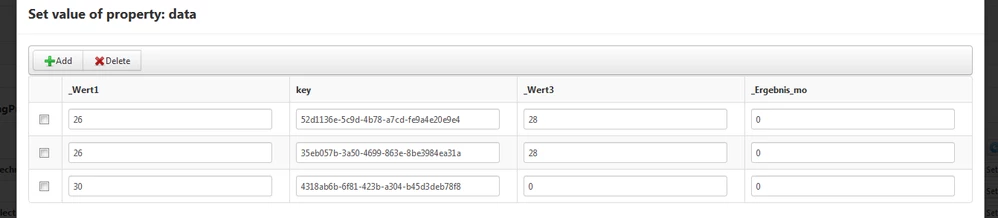
infotable.png


But if we programmatically try to add a new row with a thingworx service it only adds a new row without the generation of a key and analysis job:
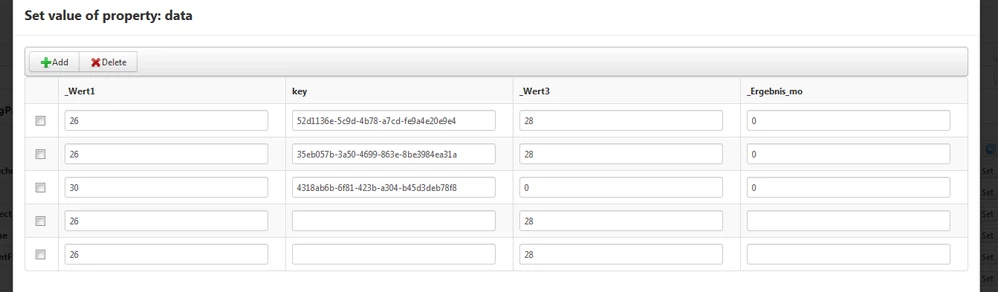
infotable2.png

var newRow = new Object();
newRow._Wert1 = 26;
newRow._Wert3 = 28;

me.data.AddRow(newRow);

What could cause such a behaviour?

Do we need to do some additional steps for this to work?


Thank you in advance,

Max

1 reply

19-Tanzanite
December 11, 2018

Hi


Maybe this article can help:

https://www.ptc.com/en/support/article?n=CS277418


You can find it by searching the keywords  "ThingPredictor infotable" in our Knowledge Base.

Feel free to use it next time you face an issue, there is a lot of valuable information .


Hope this helps

Kind regards

Christophe

Max36-ContributorAuthor
6-Contributor
December 12, 2018

Hello Christophe,


I looked into the link you provided me, thank you.


But it still doesn´t seem to work for me.


I created two services AddNewRow and SetInfotable:

lü2.png


lü.png


But it still doesn´t generate a key.


Can you give me an example how it should be done correctly?


Thank you,

Max


19-Tanzanite
December 12, 2018

Hi @Max3


Here is a solution that will work, taking the problem a bit differently.


1) Create a persistent property on the thing, named, let's say trigger

2) Create the Analysis Event in Analytics Manager to trigger on DataChange event for the property trigger

3) in your original code, simply increase the value of trigger

me.data.RemoveAllRows();
var newRow = new Object(); newRow._Wert1 = 26; newRow._Wert3 = 28; me.data.AddRow(newRow);
me.trigger = me.trigger+1;


This works well on my side, analysis jobs are being triggered and executed.


Hope this helps

Kind regards

Christophe