
5-Regular Member
Question

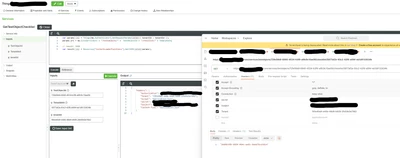
GetJSON not returning value if JSON is just value response
EK_10370207_0-1687288536849.png

I am making a API call to a 3rd party service that returns a JSON response with the content of just the value (as opposed to "key":"value" of normal JSON).  Thingworx does not seem to like this and doesn't return a usable response except for the headers.  GetText does not work as the response is automatically formatted as JSON. See attached image for format of response from Postman

ThingWorx 9.1.8-b845

10 replies

22-Sapphire I

Have you tried to output/cast the value that is returned from GetJSON as string to see if that works?

The output you show on the right screenshot though, ... can that even be considered a json?

Translate
5-Regular Member

I've tried doing JSON.stringify and JSON.parse, but it contains nothing in the body. As far as considered to be JSON, technically, it can be.  It is just a string-quoted value without a key.

Translate
22-Sapphire I

What you can try is to set the output result to 'String' without doing any stringify or parse to see what the service receives back from the call.

Translate
16-Pearl

wcui_0-1687833558008.png

TW RestAPI is not strong as Postman, the best solution is let 3rd party service send back a normal JSON format response.

Except that, hHave you tried tunning the header option of GetJSON parameter? (red line). For example, set "*/*" for Accept option of header.

Besides, there are other services you can verify(green line), such as LoadBinary, LoadJSON.


Translate
17-Peridot

I would suspect that just "somevalue" is not a valid json response. E.g. when trying to parse just a string in JavaScript

nmutter_0-1687986371815.png

Actually wikipedia states that RFC 4627 is the latest json spec since 2006. And also e.g. https://jsonformatter.curiousconcept.com/# when choosing this RFC says it is not valid

nmutter_1-1687986544548.png


I did not research what RFC is used by TWXs json interpreter but I assume it will be the same like I have in my browser (1st screeshot) which says its not valid.


Because of that I would try to just user GetText

(return type String)

result = Resources["ContenLoa..."].GetText(..

If this would have your expected response, you could interprete it like you want. Hope this works as it may complain about the actual Content-Type send by the server.. Worth a try.

I am not clear what "GetText does not work as the response is automatically formatted as JSON" means exactly - if it throws an error or what does not work here.

Translate