
14-Alexandrite
April 8, 2019
Solved

Google Maps adding API key in version 3.0.3

  • April 8, 2019
  • 1 reply
  • 1809 views

Good day All,


I am having some difficulties getting the new version of the Google Maps Extension to work with a Google API key. I have followed the steps in the supporting documentation but I am clearly missing something.


I have created the API key, downloaded the extension from the marketplace and saved to a directory. When I execute the GetGoogleMapConnectionString I get this result:
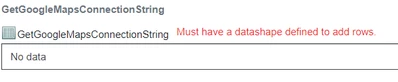
 

google maps message.png


And when I run the SetGoogleMapConnectionString I get the following error message:

"Unable to Invoke Service SetGoogleMapsConnectionString on PlatformSubsystem : Table [PlatformInformation] does not have a field named [googleMapsConnectionString]".


Any advice to what step I am missing?


Kind regards,

Johan Bester

Best answer by Rick-Stanley

Instead of executing the services you mentioned, I find it easier to modify the parameters in the Subsystem section of ThingWorx. There are directions that cover this method here:

https://developer.thingworx.com/en/resources/guides/google-map-widget-how/configure-google-maps-widget-extension

1 reply

5-Regular Member
April 8, 2019

Instead of executing the services you mentioned, I find it easier to modify the parameters in the Subsystem section of ThingWorx. There are directions that cover this method here:

https://developer.thingworx.com/en/resources/guides/google-map-widget-how/configure-google-maps-widget-extension

jbester14-AlexandriteAuthor
14-Alexandrite
April 8, 2019

Hi @Rick-Stanley ,


Thank you for your reply. It seems like the version of Thingworx I am running (8.3.4) does not have the property "Required string to connect with Google for Google widgets" in the PlatformSubsystem. I am assuming then that Google Maps version 3.0.3 would not work, as documented, on Thingworx 8.3.3+?


Should I revert back to version 3.0.1?


Thanks for the assist.