13-Aquamarine
March 31, 2025
Solved

Grid Inline Editing Not Working

  • March 31, 2025
  • 2 replies
  • 541 views

Hi all,


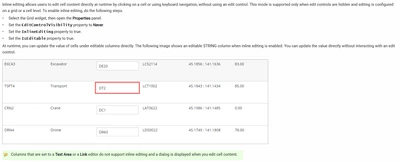
Trying to enable inline grid editing and am having issues with it working. I followed the instructions in the ptc support documentation (will paste below for reference). 
JK_10744682_0-1743430606355.png

JK_10744682_1-1743430643549.pngJK_10744682_2-1743430663232.pngJK_10744682_3-1743430687936.png


Grid still shows like this with the edit icon and doesn't allow inline editing. Any ideas on what else may be missing? Version 9.7.

JK_10744682_4-1743430753068.png


Best answer by TonyZhang

Hi @JK_10744682,


Please check Configure Grid Columns > Column Renderer to see what Column Renderer is configured for the Comments column.

Also, check if Text Area is set for Cell Editor.

As per the Help Center, "Columns that are set to a Text Area or a Link editor do not support inline editing and a dialog is displayed when you edit cell content."


And probably this is not the issue in your case but please also make sure you select Entire Grid or Single Cell for EditLevel to make Inline editing work.


2 replies

TonyZhang16-PearlAnswer
16-Pearl
April 2, 2025

Hi @JK_10744682,


Please check Configure Grid Columns > Column Renderer to see what Column Renderer is configured for the Comments column.

Also, check if Text Area is set for Cell Editor.

As per the Help Center, "Columns that are set to a Text Area or a Link editor do not support inline editing and a dialog is displayed when you edit cell content."


And probably this is not the issue in your case but please also make sure you select Entire Grid or Single Cell for EditLevel to make Inline editing work.


16-Pearl
April 9, 2025

Hi @JK_10744682 ,

It appears that a response to this post answers your question.  For the benefit of other Community Members who may have the same question, it would be great if you could designate it as the Accepted Solution.

In the event that this response did not answer your question, please post your current status so that we can continue to support.

Thanks for using the PTC Community!

Regards,