14-Alexandrite
November 4, 2022
Solved

Grid table colour change based on date

  • November 4, 2022
  • 1 reply
  • 1779 views

Hi,


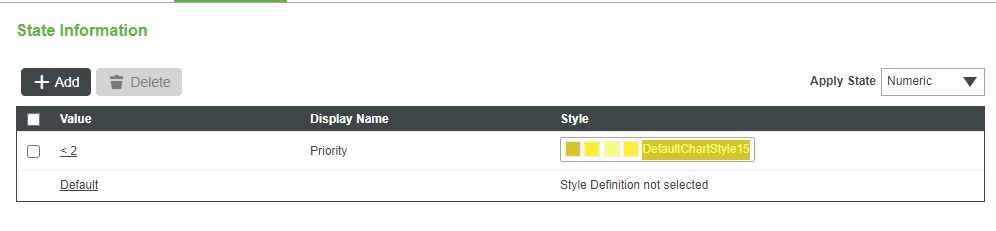
Need to know how to change the colour of the grid row based on the date.


I can change the colour based on string/Numeric.

SCOTT20_0-1667564243005.png


Thanks in advance

Keerthivarman

Best answer by TravisPickett

So one of the issues with doing the formatting based on date is that dates are always changing including the comparison start date.  There is a need to get the data in a start of semi fixed values so the state based formatter can work.  For the example below I query my fridge for the fridge temperature history, which gives me the results( id, timestamp, value ).  Then add a new column called "DateDiff" which just so happens to match my return data shape named "FridgeTempHistoryWithDateOffset".   Then loop through the results comparing the dates of the property history to now.  This will give the comparison value to use in state based formatting.


// result: INFOTABLE dataShape: "NumberValueStream"
result = Things["TestFridge2"].QueryNumberPropertyHistory({
	oldestFirst: false, maxItems: 100, propertyName: "fridgeTemp",});

// add date diff column
result.AddField( { name: "DateDiff", baseType: 'NUMBER'} );

let dNow = new Date();

// only done for illustration purposes.
result.rows[0].timestamp = dNow;
result.rows[1].timestamp = dNow - ( 1000 * 3600 * 24 );

result.rows.toArray().forEach( row => {
 row.DateDiff = ( dNow.getTime() - row.timestamp )/( 1000 * 3600 * 24 );
});


Since in theory I am not interested in the DateDiff column in my display I remove it from showing in the grid but still use the value for formatting.  Using the results from the above service, I can get the attached output.  Not the grid on the right shows DateDiff just for visual reference.


Thanks,

1 reply

12-Amethyst
November 4, 2022

Assuming you are wanting to color code records that are older the X days one color and older than Y days a different color you could do the following.

  • Add a column to the returned data shape -> DateOlderThan
  • In the service that generates the infotable
    • Loop through the records before returning
    • Set the DateOlderThan to a numeric value ( date difference )
  • In The Grid
    • Hide the DateOlderThan Column
  • Use the same State Formatting Logic
14-Alexandrite
November 4, 2022

Hi,


Can you elaborate it please. I couldn't understand it.


thanks


12-Amethyst
November 4, 2022

So one of the issues with doing the formatting based on date is that dates are always changing including the comparison start date.  There is a need to get the data in a start of semi fixed values so the state based formatter can work.  For the example below I query my fridge for the fridge temperature history, which gives me the results( id, timestamp, value ).  Then add a new column called "DateDiff" which just so happens to match my return data shape named "FridgeTempHistoryWithDateOffset".   Then loop through the results comparing the dates of the property history to now.  This will give the comparison value to use in state based formatting.


// result: INFOTABLE dataShape: "NumberValueStream"
result = Things["TestFridge2"].QueryNumberPropertyHistory({
	oldestFirst: false, maxItems: 100, propertyName: "fridgeTemp",});

// add date diff column
result.AddField( { name: "DateDiff", baseType: 'NUMBER'} );

let dNow = new Date();

// only done for illustration purposes.
result.rows[0].timestamp = dNow;
result.rows[1].timestamp = dNow - ( 1000 * 3600 * 24 );

result.rows.toArray().forEach( row => {
 row.DateDiff = ( dNow.getTime() - row.timestamp )/( 1000 * 3600 * 24 );
});


Since in theory I am not interested in the DateDiff column in my display I remove it from showing in the grid but still use the value for formatting.  Using the results from the above service, I can get the attached output.  Not the grid on the right shows DateDiff just for visual reference.


Thanks,