
15-Moonstone
May 27, 2025
Solved

Grid widget Filter box CSS

  • May 27, 2025
  • 1 reply
  • 475 views

Hi,


Version :  Thingworx 9.6.1


Please check the attached image.


Need help to update css of filter box in Grid widget. Providing the sample that I tried which didn't work.

@supports (ptcs-style-unit: "PTCS-CORE-GRID") {

    [part~=simple-filter] {   

    font-family: 'Segoe UI' !important;

    }

}

Please let me know if you are able to figure out
Best answer by TonyZhang

Hi @krishnakomal123,


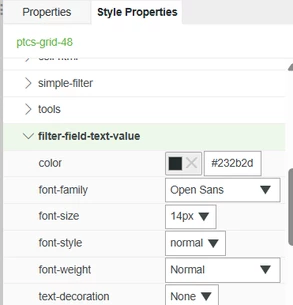
It is recommended to use Style Properties tab to configure the font-family for text value in Grid filter.

TonyZhang_0-1748487430013.png

However, if you really need to apply a font-family that is not available in the list for some reason, you need to target the text-value part of the ptcs-textfield in custom CSS.

Please try the below CSS; I'm using cursive so that whether the font-family is applied or not should be easily noticed.

@supports (ptcs-style-unit: "PTCS-TEXTFIELD") {
 [part~=text-value] { 
 font-family: cursive !important;
 }
}


Best,

1 reply

TonyZhang16-PearlAnswer
16-Pearl
May 29, 2025

Hi @krishnakomal123,


It is recommended to use Style Properties tab to configure the font-family for text value in Grid filter.

TonyZhang_0-1748487430013.png

However, if you really need to apply a font-family that is not available in the list for some reason, you need to target the text-value part of the ptcs-textfield in custom CSS.

Please try the below CSS; I'm using cursive so that whether the font-family is applied or not should be easily noticed.

@supports (ptcs-style-unit: "PTCS-TEXTFIELD") {
 [part~=text-value] { 
 font-family: cursive !important;
 }
}


Best,