
1-Visitor
February 14, 2018
Solved

Help needed: trying to import time-series data into Analytics Builder

  • February 14, 2018
  • 5 replies
  • 3746 views

Hey All,


Setup - Thingworx 8.1 (Windows) and Thingworx Analytics 8.1 (Standalone linux)

I am trying to import dataset into analytics builder file attached (json and csv) bascially its exchange rates 

and the first column is time stamps every 15 mins . 


Ive managed to get the data into analytics builder when i use this meta data configuration note bold for the time stamp

[{
"fieldName": "Time",
"dataType": "STRING",
"opType": "TEMPORAL",
"timeSamplingInterval": "900000"
},
{
"fieldName": "Open",
"dataType": "DOUBLE",
"opType": "CONTINUOUS"
},
{
"fieldName": "High",
"dataType": "DOUBLE",
"opType": "CONTINUOUS"
},
{
"fieldName": "Low",
"dataType": "DOUBLE",
"opType": "CONTINUOUS"
},
{
"fieldName": "Close",
"dataType": "DOUBLE",
"opType": "CONTINUOUS"
},
{
"fieldName": "Volume",
"dataType": "DOUBLE",
"opType": "CONTINUOUS"
}
]

but when i try building models from this dataset it runs for a while maybe 15 seconds and then i get this errorscreenshot12.jpg
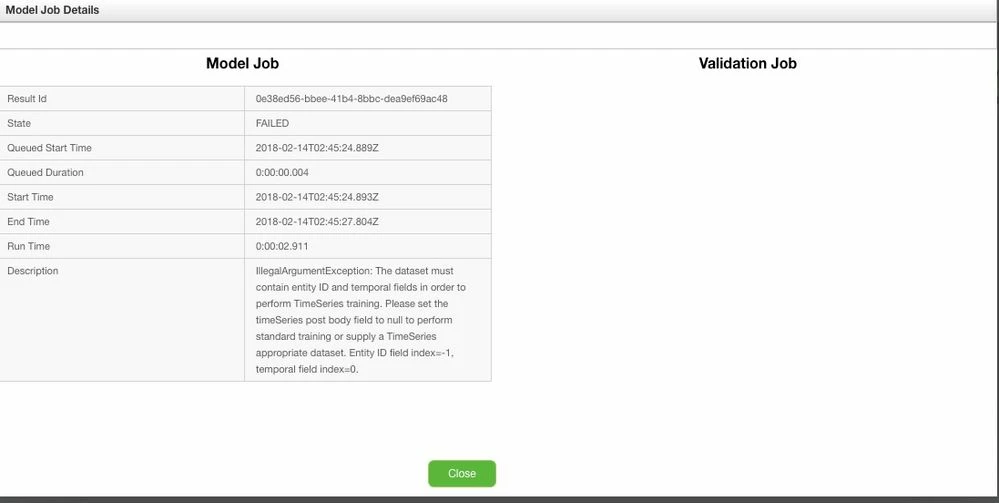
 

Now i know im probably not using the correct format and "opType" for the time stamp in the configuration metadata files,but i cant find appropriate documentation to assist with this. Tried the Transition guide for 8.1 but nothing really about specific time-series data types . If anybody know where i can find documentation on json metadata configuration just point me in the direction please. 


sample of the csv data

Time,Open,High,Low,Close,Volume
2015-12-29 00:00,1.09746,1.09783,1.09741,1.09772,486680003.2
2015-12-29 00:15,1.09772,1.098,1.0977,1.0979,445919999.1
2015-12-29 00:30,1.0979,1.09805,1.09782,1.09792,1210700005
2015-12-29 00:45,1.09792,1.09825,1.09775,1.09808,1116909992
2015-12-29 01:00,1.09808,1.09824,1.09791,1.09822,503880003


Thanks for your help 

Cheers

Paul B

Best answer by cmorfin

Hi


For a time series dataset you need to have 2 specific additional fields compare to non time series one.

One field is with the opType TEMPORAL as you did already.

The other field is with opType ENTITY_ID. The entity_id field is used to identify the source of the data. one csv dataset can indeed contains temporal data from different sources, the entity_id allows to identify this source.

In your example you probably should add a column with the name of the stock you are following and set this as the entity_id. So if you follow different stock you will have different entity_id in your csv each with multiple rows at different temporal time.

If you follow only one stock, you still need to have this entity_id column. It will simply be set to the same value for all records.


Note also that the Temporal field is expected to be a number, so you may have to change the date format to use an increment from a starting point instead of an actual date.


Hope this help

Kind regards

Christophe


5 replies

cmorfin19-TanzaniteAnswer
19-Tanzanite
February 14, 2018

Hi


For a time series dataset you need to have 2 specific additional fields compare to non time series one.

One field is with the opType TEMPORAL as you did already.

The other field is with opType ENTITY_ID. The entity_id field is used to identify the source of the data. one csv dataset can indeed contains temporal data from different sources, the entity_id allows to identify this source.

In your example you probably should add a column with the name of the stock you are following and set this as the entity_id. So if you follow different stock you will have different entity_id in your csv each with multiple rows at different temporal time.

If you follow only one stock, you still need to have this entity_id column. It will simply be set to the same value for all records.


Note also that the Temporal field is expected to be a number, so you may have to change the date format to use an increment from a starting point instead of an actual date.


Hope this help

Kind regards

Christophe


1-Visitor
February 14, 2018

Hey Christophe,

Thanks again for the quick response. And thanks for the answers. 


Where can i find this type of information out rather than dropping question on public community forums? 

Can i use and Apache Neurons Spark related information given it seems that analytics uses spark jar files ? and if so can you point me in the direction of this information 


Again thanks very much for your help

Cheers

Paul B

19-Tanzanite
February 15, 2018

Hi Paul


The description of the different opType (including TEMPORAL and ENTITY_ID) is covered in the transition guide p. 29.

If you feel something is unclear or missing or can be improve, please let us know.


Kind regards

Christophe

Emeritus
April 6, 2018

Hi @baraspatch

Just wanted to follow up to confirm whether all of your questions were answered by Christophe.  If so, please indicate Accepted Solution for the benefit of our Community users.  If not, please advise on your current status.


Thanks!

Leigh