
10-Marble
May 22, 2023
Solved

Hide columns in excel export which are excluded in Grid

  • May 22, 2023
  • 2 replies
  • 1187 views

Hi Developers,


I have a grid which I am exporting into a csv file via Data Export widget. I am using ThingWorx 8.5.

There is a column (OEE) which I have excluded in Grid Configuration and I am not showing it on the screen.

However, on exporting that grid data, it is coming in the excel file.

I need to remove OEE column, kindly suggest how to exclude it from excel.

Thanks in Advance.


Best answer by nmutter

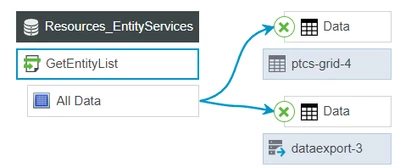
The Grid shows data provided from an Infotable.

The Data export widget also takes the same Infotable data.

nmutter_0-1684787126963.png


There is no connection between Grid-configuration and the DataExport widget. If you don't want to export a specific column, the column must not be in the infotable. Maybe you can use https://www.ptc.com/en/support/article/CS180324 to remove the column in the service providing the Infotable?

2 replies

nmutter16-PearlAnswer
16-Pearl
May 22, 2023

The Grid shows data provided from an Infotable.

The Data export widget also takes the same Infotable data.

nmutter_0-1684787126963.png


There is no connection between Grid-configuration and the DataExport widget. If you don't want to export a specific column, the column must not be in the infotable. Maybe you can use https://www.ptc.com/en/support/article/CS180324 to remove the column in the service providing the Infotable?

17-Peridot
May 23, 2023

Hello @VK_10159720 ,


Where are you getting the data from?

If it is an SQL query, it might be simplest to just write a new query, leaving out the columns you do not want.

I tried finding some snippet that could do this, but couldn't really find any, so @nmutter's way with removing the field for each row might be the best way


Regards,

Jens