
1-Visitor
July 11, 2019
Solved

Highlighting Grid Row based on button pressed

  • July 11, 2019
  • 1 reply
  • 1948 views

I have a grid and I need the selected row to be highlighted with the press of a button and then un-highlighted with the press of a button. Basically I need

  1. When an un-acknowledged item is selected, make the “Acknowledge” button enabled.
  2. When the “Acknowledge” button is pressed mark the selected item as acknowledged (highlighted) and then refresh the grid view.
  3. When an acknowledged item is selected, make the “Un-Acknowledge” button enabled.
  4. When the “Un-Acknowledge” button is pressed mark the selected item as un-acknowledged and then refresh the grid view.

Below I have my mashup (snippet1) and my ack/unack service right below.
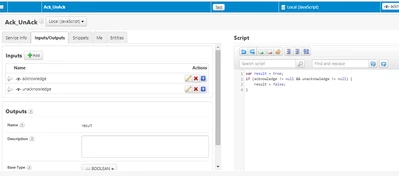
ack_unackservice.png


Best answer by slangley

Hi @Chao123.


You could use the Validator function (used to be a widget but in the current releases is located in the lower right corner of the Mashup builder).  It can be used to evaluate the Ack field on your grid.  The Validator outputs a true or false depending on the logic in your script, which you can then bind to the Disable property for your button in order to set it appropriately.


Regards.


--Sharon

1 reply

slangleyCommunity ManagerAnswer
Support
July 17, 2019

Hi @Chao123.


You could use the Validator function (used to be a widget but in the current releases is located in the lower right corner of the Mashup builder).  It can be used to evaluate the Ack field on your grid.  The Validator outputs a true or false depending on the logic in your script, which you can then bind to the Disable property for your button in order to set it appropriately.


Regards.


--Sharon

Chao1231-VisitorAuthor
1-Visitor
July 18, 2019

I created two services ack and unack. Ack will highlight grid row when pressed and changes the format of the rows and unack will un-highlight and change format back to original grid view. I used the updatedatatableentry snippet for both to help me achieve this. Thanks!