
13-Aquamarine
November 7, 2023
Solved

How and where to import external javascript files into a widget

  • November 7, 2023
  • 2 replies
  • 1617 views

Hi,

I am at the moment implementing a QR Code scanning widget with the help of the github project HTML5 QR Code reader.


I am using the Eclipse Extension plugin and the Eclipse Extension sdk

How and where should external javascript and css files be referenced, I know that they should be kept in the ui folder, but I do not know where to reference them, the code i have found it this (append the script in the head):


$("head").append("<script type="text/javascript" src="../Common/Extensions/QRCodeExtension/ui/qrcode_widget/scanner2-core.js"></script>)


Kindly


Oskar Berntorp


Best answer by Velkumar

Hi @oskarberntorp 


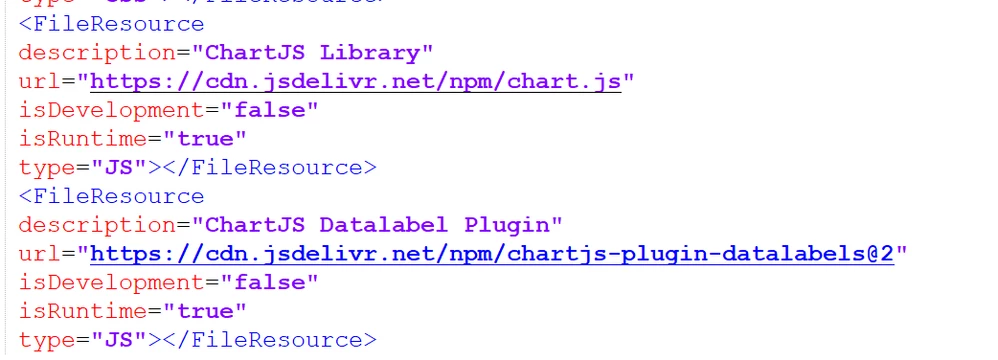
You can mention external javascript reference in the metadata.xml file


Velkumar_0-1699436898060.png


/VR


2 replies

Velkumar19-TanzaniteAnswer
19-Tanzanite
November 8, 2023

Hi @oskarberntorp 


You can mention external javascript reference in the metadata.xml file


Velkumar_0-1699436898060.png


/VR


13-Aquamarine
November 13, 2023

Hi Velkumar,

I can see that your answer do not mention local javascript files, how should their url look?

// Oskar

19-Tanzanite
November 14, 2023

Hi @oskarberntorp 


You can mention custom js like this.


Velkumar_2-1699936791010.png


Place your files under folder ui > WIDGET NAME >

Velkumar_1-1699936646752.png


/VR


19-Tanzanite
November 8, 2023

And to add to what @Velkumar stated, which is exactly what you need, you don't need to add in your runtime.js any import statement like the one you mentioned.