18-Opal
March 13, 2018
Solved

How do I adjust the text size of the List widget?

  • March 13, 2018
  • 5 replies
  • 3859 views

Hello


It is strange to adjust the text size of the list widget.
A text size of about 24 sizes can be handled appropriately through listFormat.
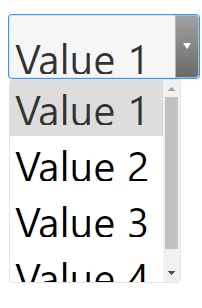
However, text sizes larger than 24 are displayed with the upper part of the character truncated
Currently I am using version 7 of ThingWorx.
Cause this is the problem ??


Or, if you are using a list widget over than 36px text size, please share it.


Thank you.
Best answer by Yedukrishnan

Hello @CHASEONHO,


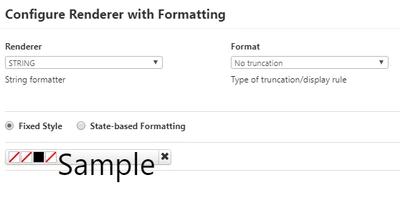
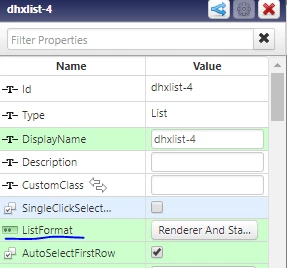
          In the list widget properties, ListFormat will be there. By giving custom style and adjust text size in that you can make it visible. 

ListWidget.PNG      list2.PNG 

The list with 42 as text size is viewed in UI as given below    

           List.PNG

However, this option is available in Thingworx 8.2 version. I will check and let you know in 7.4 version.


With regards

Yedukrishnan

5 replies

5-Regular Member
March 15, 2018

Hi @CHASEONHO is it possible to share a screenshot on how the text is getting truncated?

CHASEONHO18-OpalAuthor
18-Opal
March 19, 2018

dddd.png


Cropped as you see.
The list display all test, but didn't display all text selected items

14-Alexandrite
March 19, 2018

Hello @CHASEONHO,

          In the list widget properties, ListFormat will be there. By giving custom style and adjust text size in that you can make it visible. 

ListWidget.PNG      list2.PNG 

The list with 42 as text size is viewed in UI as given below    

           List.PNG

This option is available in Thingworx 7.3 version. Please check it.


With regards

Yedukrishnan

14-Alexandrite
March 19, 2018

Hello @CHASEONHO,


          In the list widget properties, ListFormat will be there. By giving custom style and adjust text size in that you can make it visible. 

ListWidget.PNG      list2.PNG 

The list with 42 as text size is viewed in UI as given below    

           List.PNG

However, this option is available in Thingworx 8.2 version. I will check and let you know in 7.4 version.


With regards

Yedukrishnan

CHASEONHO18-OpalAuthor
18-Opal
March 20, 2018

Thank you!
If it is English, it will be displayed.
In case of Hangul, if the text size is more than 28, it will be cut and displayed.
A friendly answer Thanks again.