
16-Pearl
August 10, 2023
Solved

How to add a query to a paginated grid advanced widget

  • August 10, 2023
  • 2 replies
  • 2326 views

I followed the instructions in the link below to add pagination to grid advanced.  It works.

https://www.ptc.com/en/support/article/CS311123


I typically add the following code to add query to grid advanced.


	if (query) {
		result = Resources["InfoTableFunctions"].Query({
			t: result /* INFOTABLE */ ,
			query: query /* QUERY */
		});
	} 


For the paginated grid advanced, I tried the code below to match the output infotable, but it's not working.  Is there a way to add query to a paginated grid advanced?


	if (query) {
		result = Resources["InfoTableFunctions"].Query({
			t: result.Data /* INFOTABLE */ ,
			query: query /* QUERY */
		});
	} 


Best answer by Arun_C

Hi @Willie , 


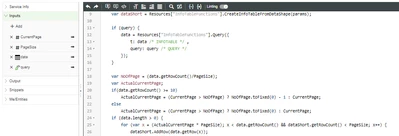
If I'm understanding you statement clearly, You need to query based on the main data and split it into pages?


Please take a look on the code snapshot it may hepls you. We added the "Query" snippet at top of the GetPaginatedEntires services with Input - "query" and then we formed the splitted pages row data based on the quired from main infotable - "data" & the serive were executed by 1 more event of "FilterChanged".


Arun_C_0-1691734140407.png

If Its not making sense means, Can you please ellaborate your query more for better understanding?


Thanks & Regards,

Arun C


2 replies

16-Pearl
August 10, 2023

HI @Willie ,


We tried with below given steps were worked for us-

If need query/filter the entires on each pages, after all paginated data are printed on pages means, we created 1 more service with 2 Inputs,

  1. Infotable input - to recive the data from the service GetPaginatedEntries - 'Data' Field 
  2. Query input - to collect the query fron grid widget

and Output as Infotable as same as in below snapshot to print the data to the GridAdvanced widget.


Arun_C_0-1691660141503.png

And bind the service exection events from GetPaginatedEntries - Invoke & Grid Filter Changed.


Arun_C_1-1691661869288.png


Thanks & Regards,

Arun C

Willie16-PearlAuthor
16-Pearl
August 11, 2023

Hi @Arun_C 


The solution provided worked, but it only queried the current page.  It did not query the entire infotable.  Is there a way to query the entire infotable?

Arun_C16-PearlAnswer
16-Pearl
August 11, 2023

Hi @Willie , 


If I'm understanding you statement clearly, You need to query based on the main data and split it into pages?


Please take a look on the code snapshot it may hepls you. We added the "Query" snippet at top of the GetPaginatedEntires services with Input - "query" and then we formed the splitted pages row data based on the quired from main infotable - "data" & the serive were executed by 1 more event of "FilterChanged".


Arun_C_0-1691734140407.png

If Its not making sense means, Can you please ellaborate your query more for better understanding?


Thanks & Regards,

Arun C


12-Amethyst
August 10, 2023

Hi @Willie,


Looking at your second code snippet instead of setting the return of the Query to result you should set it to result.Data, if your return from the service follows the support article.


if (query) {
	result.Data = Resources["InfoTableFunctions"].Query({
	t: result.Data /* INFOTABLE */ ,
	query: query /* QUERY */
 });
}


Thanks,


Travis

Willie16-PearlAuthor
16-Pearl
August 10, 2023

Oops.  I missed that.  Good catch!