11-Garnet
Mar 21, 2024 8:35 AM UTC
Solved

How to add an image from a repository to a table?

Hello,everyone!

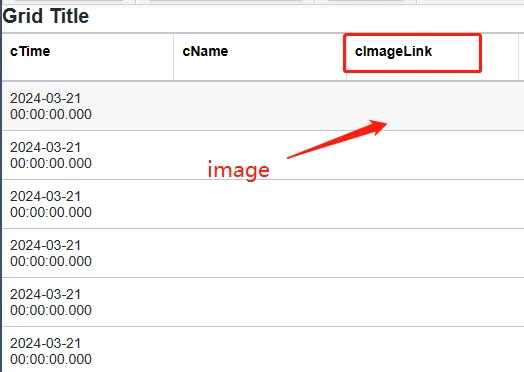
Why does it fail when I use the AddDataTableEntry service to add an image from a repository to a table?

企业微信截图_17110097947317.png企业微信截图_17110100109309.png企业微信截图_1711009854871.png

17-Peridot
Mar 22, 2024 9:06 PM UTC
  • Create one more field with "IMAGE" basetype
  • Use GetImage() to get the image from respository  and insert into infotable
// CreateInfoTableFromDataShape(infoTableName:STRING("InfoTable"), dataShapeName:STRING):INFOTABLE(test_grid_image)
let image_data = Resources["InfoTableFunctions"].CreateInfoTableFromDataShape({
 infoTableName: "InfoTable",
 dataShapeName: "test_grid_image"
});

// result: INFOTABLE dataShape: "FileSystemFileWithLinks"
var fileList = Things["SystemRepository"].GetFileListingWithLinks({
	path: undefined /* STRING */,
	nameMask: undefined /* STRING */
});

var fileCount = fileList.length;
var f = 0;
for( ; f < fileCount; f++){
 let newEntry = {
 path: undefined, // STRING [Primary Key]
 size: undefined, // NUMBER
 downloadLink: undefined, // HYPERLINK
 lastModifiedDate: undefined, // DATETIME
 name: undefined, // STRING
 img: Things["SystemRepository"].LoadImage({
 path: "/image.png" /* Replace with youe actual image paths*/
 }) // IMAGE
 }; 
 image_data.AddRow(newEntry);
}
result = image_data;

It worked for me.

6 replies

Rocko
19-Tanzanite
Mar 21, 2024 12:59 PM UTC

Hard to tell with the information given. Check the logs. Maybe the user lacks access/service execute privileges to access the file.

Maybe it does not get added to the DataTable. Maybe it's not queried correctly. Maybe the type is wrong.

Check if the link is contained in the datatable. Check the link is contained in the infotable you use as data source in the grid.

Translate
Snoopy_hu11-GarnetAuthor
11-Garnet
Apr 3, 2024 2:07 AM UTC

Ok thanks, I'll check the logs afterward!

Translate
pshashipreetham
19-Tanzanite
Mar 22, 2024 8:31 AM UTC

hi @Snoopy_hu ,


In Column format of the colum "cImageLink" what did you give it?, it should ImageLink type


Thanks,

Translate
Shashi Preetham || +91 8099838801 || shashi@psptechhub.com
Snoopy_hu11-GarnetAuthor
11-Garnet
Apr 3, 2024 2:08 AM UTC

Yes, I chose the imagelink type.

Translate
17-Peridot
Mar 22, 2024 9:06 PM UTC
  • Create one more field with "IMAGE" basetype
  • Use GetImage() to get the image from respository  and insert into infotable
// CreateInfoTableFromDataShape(infoTableName:STRING("InfoTable"), dataShapeName:STRING):INFOTABLE(test_grid_image)
let image_data = Resources["InfoTableFunctions"].CreateInfoTableFromDataShape({
 infoTableName: "InfoTable",
 dataShapeName: "test_grid_image"
});

// result: INFOTABLE dataShape: "FileSystemFileWithLinks"
var fileList = Things["SystemRepository"].GetFileListingWithLinks({
	path: undefined /* STRING */,
	nameMask: undefined /* STRING */
});

var fileCount = fileList.length;
var f = 0;
for( ; f < fileCount; f++){
 let newEntry = {
 path: undefined, // STRING [Primary Key]
 size: undefined, // NUMBER
 downloadLink: undefined, // HYPERLINK
 lastModifiedDate: undefined, // DATETIME
 name: undefined, // STRING
 img: Things["SystemRepository"].LoadImage({
 path: "/image.png" /* Replace with youe actual image paths*/
 }) // IMAGE
 }; 
 image_data.AddRow(newEntry);
}
result = image_data;

It worked for me.

Translate
Snoopy_hu11-GarnetAuthor
11-Garnet
Apr 3, 2024 2:09 AM UTC

Ok thanks, I'll give it a try as soon as possible

Translate