
12-Amethyst
June 19, 2023
Solved

How to add Custom Button in Grid Widget

  • June 19, 2023
  • 1 reply
  • 2028 views

Hello 


I want to remove Display and Reset button and add new button at right side/ replace reset button with add button, how can I do this 


In below image I want to replace reset button and hide display drop down
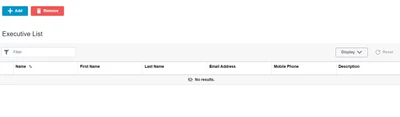
ParthBhadiyadra_0-1687157210824.png


Best answer by jensc

Hello,


In a quite recent release PTC added the possibility to add custom buttons to the grid widget.

So if you are on a very recent release of Thingworx you should be able to follow above link for what you want to do.


Regards,

Jens

1 reply

jensc17-PeridotAnswer
17-Peridot
June 19, 2023

Hello,


In a quite recent release PTC added the possibility to add custom buttons to the grid widget.

So if you are on a very recent release of Thingworx you should be able to follow above link for what you want to do.


Regards,

Jens

12-Amethyst
June 19, 2023

Hello @jensc 


Thank you for your reply 


I am using the Thingworx 9.3.7 Version there is no support this way so there is any other way to achieve this.

17-Peridot
June 19, 2023

Hello,


I suppose you could move the buttons if you use a static mashup so that they "appear" to be a part of the grid widget.

But I wouldn't say that it is a good option.


Regards,

Jens